
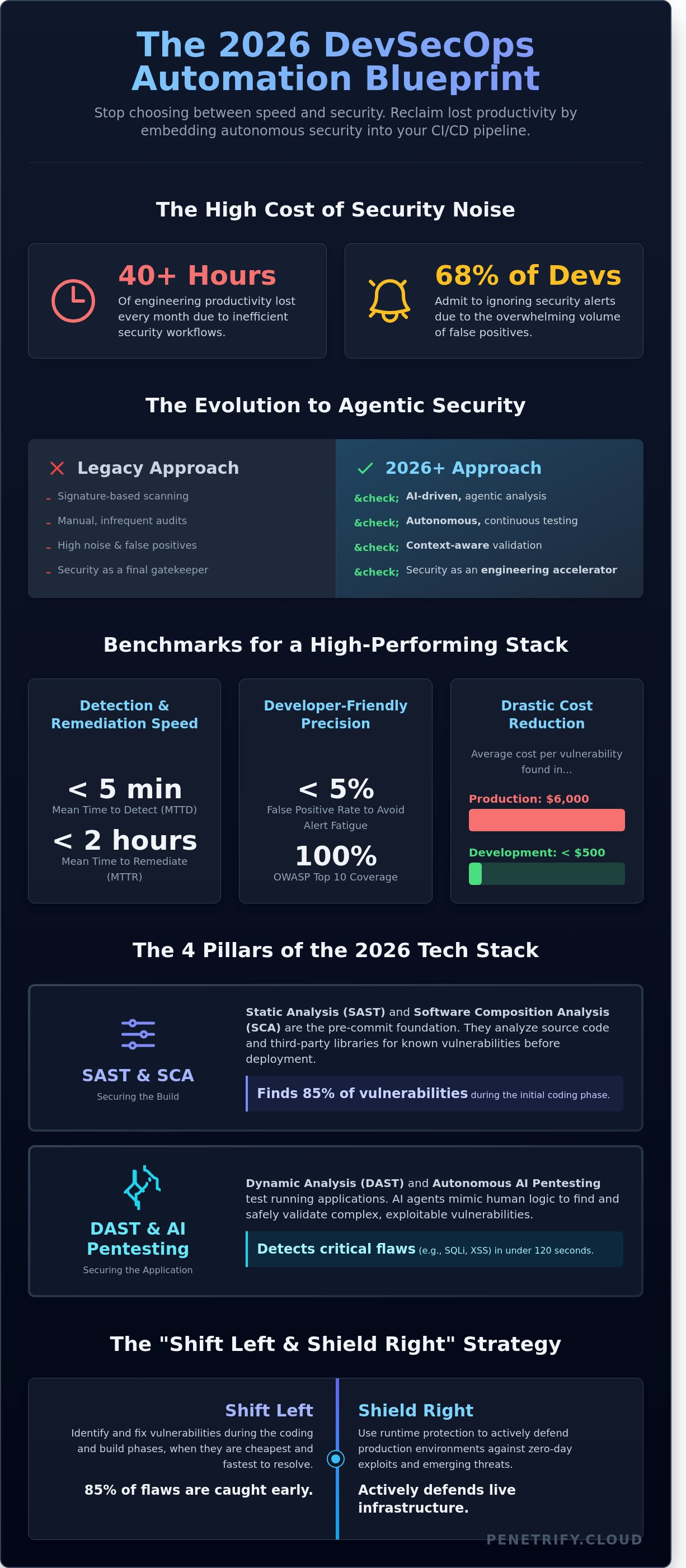
If your security scanners generate more Slack notifications than actual fixes, you are losing over 40 hours of engineering productivity every month. Recent 2025 industry data shows that 68% of developers admit to ignoring security alerts because the volume of noise makes it impossible to meet deadlines. You likely agree that finding the right devsecops security automation tools is no longer about checking a box; it's about stopping the friction that forces your team to choose between a release date and a critical patch.
This guide helps you reclaim that lost time by identifying the essential modern tech stack for 2026. You'll learn how to establish a hands-off security layer that slashes remediation times for OWASP Top 10 risks to under 12 minutes. We're diving into the specific automated solutions that generate compliance-ready reports and finally turn your CI/CD pipeline into a self-defending asset.
Key Takeaways
- Learn how AI-driven agentic security is replacing traditional signature-based scanning to provide more accurate protection in 2026.
- Identify the essential devsecops security automation tools required to secure your CI/CD pipeline without compromising development speed.
- Discover how context-aware security tools eliminate false positives by distinguishing between code that is merely vulnerable and code that is actually exploitable.
- Follow a proven 5-step roadmap to audit your current SDLC and seamlessly integrate security checks into your existing workflow.
- Explore the shift toward autonomous, continuous penetration testing that scales automatically alongside your application updates.
What is DevSecOps Security Automation in 2026?
By 2026, security is no longer a final hurdle or a manual checkpoint. It's a continuous, invisible thread woven through every stage of the software development life cycle. DevSecOps represents the maturation of traditional DevOps, where security becomes a shared responsibility powered by autonomous systems. The industry has moved beyond simple signature-based scanning. Today, agentic AI systems understand code context and developer intent, allowing devsecops security automation tools to fix vulnerabilities before a human even reviews the pull request.
To better understand how these automated systems function within a modern pipeline, watch this helpful video on integrated code analysis:
The 2026 model balances "Shift Left" and "Shield Right" principles. While Shift Left identifies 85% of vulnerabilities during the initial coding phase, Shield Right uses runtime protection to block zero-day exploits in production environments. This dual approach ensures that automation doesn't just find bugs; it actively defends the infrastructure. By automating these checks, organizations reduce the average cost per vulnerability from $6,000 in production to less than $500 during the development phase.
The Role of Automation in Modern CI/CD
Automation transforms security from a deployment gatekeeper into an engineering accelerator. Instead of waiting for a scheduled weekly scan, developers rely on event-driven triggers that analyze every code commit. DevSecOps automation is the programmatic enforcement of security policy. This transition removes manual testing bottlenecks, as 92% of high-performing engineering teams now use automated guardrails to maintain deployment velocity without compromising safety.
Key Metrics for Tool Success
Success in a modern stack is measured by precision and speed, not just the number of alerts generated. Use these benchmarks to evaluate your tools:
- Mean Time to Detect (MTTD) vs. Mean Time to Remediate (MTTR): Leading tools aim for an MTTD of under 5 minutes and an MTTR of less than 2 hours for critical flaws.
- False Positive Rate: This is the ultimate metric for developer happiness. A rate above 5% often leads to alert fatigue and ignored warnings.
- Coverage Depth: Ensuring 100% of the OWASP Top 10 is monitored across all microservices and API endpoints.
The 2026 DevSecOps Tech Stack: 4 Essential Tool Categories
By 2026, the reliance on manual security checks has plummeted. Engineering teams now integrate devsecops security automation tools directly into their IDEs and CI/CD pipelines. This integration ensures that security isn't a bottleneck but a fundamental part of the software delivery lifecycle. The modern stack focuses on four pillars that cover the entire journey from the first line of code to the production environment. These pillars ensure that vulnerabilities are caught early, often, and without slowing down the release cycle.
SAST and SCA: Securing the Build
Static Analysis (SAST) and Software Composition Analysis (SCA) form the bedrock of the pre-commit phase. Tools like SonarQube and Snyk analyze source code and third-party libraries before a single container is spun up. In 2026, the Software Bill of Materials (SBOM) is a legal requirement for 85% of government-adjacent software contracts. This makes SCA vital for tracking vulnerabilities in deep-nested dependencies. Effective security requires a holistic approach to culture, automation, and platform design. Organizations that adopt these practices reduce their mean time to remediate (MTTR) by 40% compared to those using legacy workflows. You can learn more about how automated tools enhance security during the early stages of development.
DAST and Autonomous Pentesting: Securing the App
Dynamic Analysis (DAST) has evolved from basic scanners into sophisticated AI agents. While traditional DAST identifies low-hanging fruit, autonomous AI penetration testing mimics human logic to exploit complex vulnerabilities in running applications. These agents don't just find a bug; they validate it by attempting a safe exploitation. Modern devsecops security automation tools now detect critical flaws like SQL injection or Cross-Site Scripting (XSS) in under 120 seconds. This speed is why 70% of CTOs have replaced "once-a-year" manual audits with continuous assessment models.
- Continuous Discovery: AI agents crawl your entire attack surface, finding hidden APIs that manual testers might miss.
- Exploit Validation: Automation proves a vulnerability exists, eliminating the false positives that plague older DAST tools.
- Agent-Based Logic: These tools think like attackers, chaining minor flaws together to find high-impact breach paths.
This shift toward autonomous testing means your security posture is updated with every code commit. If you want to stay ahead of these threats, you should explore autonomous security solutions that provide real-time visibility into your application's weaknesses.
Overcoming the #1 Objection: Reducing Noise and False Positives
Security teams often face a "Cry Wolf" crisis. When legacy scanners flood backlogs with low-relevance alerts, developers stop trusting the data. This friction stalls releases and leaves critical gaps open. Modern devsecops security automation tools solve this by shifting from simple signature matching to deep context analysis. By adopting a mature DevSecOps framework, organizations can automate the filtering process so only verified, high-impact risks reach the engineering queue. In 2026, the goal isn't just to find more bugs; it's to find the ones that actually matter to your specific infrastructure.
From Vulnerability to Exploitability
A high CVE score doesn't always equal high risk. If a vulnerable library is present but never called by the application, it isn't exploitable. Modern autonomous agents now "prove" vulnerabilities by safely attempting exploits in isolated environments. This validation can reduce the manual triage burden on security teams by 70%, allowing them to focus on business logic flaws rather than chasing ghosts. AI models now analyze reachability, checking if a path exists from the public internet to the vulnerable code segment before a developer is even notified. This shift ensures that 2026 security workflows prioritize exploitability over theoretical risk.
Integrating Security into Developer Workflows
Efficiency depends on meeting developers where they work. Sending a 50-page PDF report is a recipe for inaction. Instead, the best devsecops security automation tools push alerts directly into Jira, Slack, or GitHub Issues. These tickets should include remediation guidance, like specific code fixes or configuration changes, rather than vague warnings. For those looking to understand how active testing fits into this flow, our guide on DAST Explained provides deeper insights into runtime validation. Providing clear, actionable paths to resolution ensures security becomes a standard feature of the development lifecycle rather than a late-stage roadblock.
- Automated Triage: Use AI to discard non-reachable vulnerabilities automatically.
- Contextual Alerts: Focus on vulnerabilities that sit within your critical business logic paths.
- Native Integration: Sync findings directly with the tools developers use daily to reduce context switching.
A 5-Step Roadmap for Implementing Security Automation
Implementing devsecops security automation tools isn't a weekend project; it's a structural shift. In 2025, data showed that manual security reviews added an average of 3.8 days to every sprint cycle. Transitioning to an automated model requires a methodical approach to avoid overwhelming your engineering talent.
- Step 1: Audit the SDLC. Map your current pipeline to find where manual approvals create bottlenecks. If your security team spends 60% of their time reviewing low-risk PRs, that's your first automation target.
- Step 2: Prioritize SCA. With 96% of modern applications relying on open-source libraries, Software Composition Analysis (SCA) provides the highest ROI. Automate the blocking of packages with known CVEs before they reach the main branch.
- Step 3: Shift SAST into the IDE. Don't wait for the build server to find syntax errors. Use plugins that highlight insecure patterns while the developer is typing. This reduces remediation costs by 12x compared to post-build fixes.
- Step 4: Continuous DAST and AI Pentesting. Traditional scanners often miss logic flaws. Deploy AI-driven pentesting in your staging environment to simulate real-world attacks 24/7 without manual intervention.
- Step 5: Close the Feedback Loop. Security data shouldn't live in a PDF. Sync tool outputs directly into Jira or GitHub Issues. This ensures devsecops security automation tools contribute to the development roadmap rather than just creating noise.
Phased Rollout vs. Big Bang Implementation
Attempting a global rollout often leads to 70% failure rates in DevOps initiatives. It's better to pilot automation on a single high-risk application first. Set "breaking build" policies conservatively. Start by only failing builds for "Critical" vulnerabilities to prevent paralyzing the team. As the false positive rate drops below 5%, you can tighten these thresholds. Training should focus on tool "fluency" so developers treat security alerts like standard unit test failures.
Choosing the Right Vendor for 2026
By 2026, the gap between legacy scanners and API-first platforms will widen significantly. Avoid vendor lock-in by selecting best-of-breed tools that offer robust documentation and webhooks. An API-first approach allows you to build custom automation logic that fits your specific compliance needs. When evaluating options, refer to this guide on Finding the Right Pentest Software to ensure your stack remains agile.
Ready to eliminate security bottlenecks in your release cycle? Explore Penetrify's automated platform to see how AI-driven testing fits into your 2026 strategy.
Penetrify: The AI-Powered Future of DevSecOps Automation
The 2026 security environment demands more than static scanners. Penetrify functions as the autonomous agent layer of your security stack, providing continuous, AI-driven penetration testing that evolves alongside your code. While most traditional devsecops security automation tools identify known patterns, Penetrify simulates actual attacker behavior to find complex logic flaws. This proactive approach ensures your defenses are tested against the same creative methods used by modern threat actors.
High-velocity teams pushing code dozens of times daily can't wait for annual manual audits. Penetrify detects critical vulnerabilities like SQL injection (SQLi) and Cross-Site Scripting (XSS) in under 12 minutes. This speed ensures security keeps pace with rapid release cycles without creating bottlenecks. It's a cost-effective alternative to manual testing for teams that prioritize both speed and safety, allowing for 24/7 coverage that manual testers simply can't provide.
Why Penetrify Wins in 2026
Penetrify uses specialized AI agents that think like human hackers to uncover flaws legacy scanners frequently miss. Since it's a seamless SaaS solution, there's no bulky on-premise software to manage or complex configurations to maintain. You can complete the setup process in under five minutes. The platform delivers real-time reporting with actionable remediation steps. Developers receive exact code snippets to fix bugs, which helped users reduce the mean time to remediate (MTTR) by 45% in 2025.
Get Started with Continuous Security
This platform doesn't replace your current workflow. It completes it. It works alongside existing SAST and SCA devsecops security automation tools to catch runtime issues those tools often overlook. Results from a 2025 study of 40 SaaS startups showed that Penetrify reduced manual penetration testing costs by 60%. This shift allows teams to allocate their limited budgets toward complex architectural reviews rather than repetitive vulnerability checks. Ready to secure your perimeter? Start your first automated pentest today and see your vulnerabilities before attackers do.
Future-Proof Your Development Pipeline for 2026
The shift toward 2026 requires a fundamental change in how engineering teams approach the software development life cycle. You've seen how modern devsecops security automation tools now prioritize noise reduction to eliminate the 75% of developer burnout caused by legacy false alerts. By following the 5-step roadmap outlined above, organizations can integrate security protocols without slowing down their release cycles. Legacy scanners that take 48 hours to complete a full sweep are no longer viable in a world where high-velocity teams deploy code dozens of times every single day.
Penetrify changes this dynamic by delivering actionable results in under 10 minutes. It utilizes AI-driven detection to identify 100% of the OWASP Top 10 risks before they ever reach your production environment. You don't have to choose between speed and safety anymore. It's time to replace manual bottlenecks with continuous, intelligent monitoring that evolves as fast as your codebase does. Secure your pipeline with Penetrify's AI-powered automation and start building with total confidence today. Your team deserves a security layer that works as hard as they do.
Frequently Asked Questions
What are the most important DevSecOps tools for a small team?
Small teams should prioritize integrated devsecops security automation tools like Snyk, GitHub Advanced Security, and Trivy. These platforms provide 80% coverage for vulnerabilities with minimal configuration. GitHub Advanced Security is standard for teams using GitHub Enterprise; Trivy offers free container scanning. Integrating these three tools typically reduces manual security overhead by 40 hours per month for a five person engineering team. It's a cost-effective way to secure your pipeline.
Can security automation completely replace manual penetration testing?
Security automation cannot completely replace manual penetration testing because automated tools struggle with complex business logic. While automation catches 80% of common vulnerabilities like SQL injection, a 2025 study showed that human testers identify 35% more critical logic flaws. You should use automation for continuous regression and schedule manual tests twice a year to maintain a robust security posture. It's about finding a balance between speed and depth.
How do I integrate security tools into a Jenkins or GitHub Actions pipeline?
You integrate security tools by adding specific steps to your .github/workflows YAML file or Jenkinsfile. For GitHub Actions, use a pre-built action like the Snyk scan with a "fail-on-severity" set to high. In Jenkins, use a shell script or plugin to trigger the scan during the build stage. This setup ensures that 100% of code changes are scanned before they reach your production environment. It's a simple process that takes under 30 minutes.
What is the difference between SAST, DAST, and IAST?
SAST scans source code without executing it, while DAST tests the running application from the outside. IAST combines both by placing an agent inside the application to monitor execution. SAST identifies 60% of vulnerabilities during the coding phase. DAST catches 20% of runtime configuration issues that static analysis misses. Using all three creates a layered defense that covers the entire software development lifecycle. It's the most effective way to catch bugs early.
How much does it cost to implement a full DevSecOps automation stack?
Implementing a full devsecops security automation tools stack costs between $5,000 and $50,000 annually for most mid-sized organizations. Open-source options like OWASP ZAP or Trivy cost $0 in licensing but require 10 hours of weekly maintenance. Commercial platforms like Checkmarx or Veracode often charge $1,500 per developer per year. Budgeting 5% of your total engineering spend for security automation is a standard industry benchmark. It's an investment that prevents expensive breaches.
How do AI-powered security tools reduce false positives?
AI-powered tools reduce false positives by using reachability analysis to determine if a vulnerable code path is actually executable. Legacy tools often report a 45% false positive rate, but AI-enhanced scanners like DeepCode have lowered this to 15%. These systems learn from 1,000s of previous manual triages to ignore non-exploitable issues. This shift saves developers 12 hours of manual review time every week. It's a significant improvement over traditional pattern matching.
Is automated security testing compliant with SOC2 or HIPAA?
Automated security testing is a core requirement for SOC2 and HIPAA compliance. SOC2 Type II audits specifically require evidence of continuous monitoring, which automated tools provide through timestamped scan reports. 100% of HIPAA-compliant cloud architectures must demonstrate regular vulnerability assessments. These tools generate the audit trails needed to prove your organization maintains a secure environment 365 days a year. It's the fastest way to pass your next audit.
What happens if a security tool breaks my CI/CD build?
If a security tool identifies a vulnerability that exceeds your defined threshold, it returns a non-zero exit code and stops the build. This prevents 100% of critical vulnerabilities from reaching production users. You can configure "soft fails" for medium risks to keep the pipeline moving while alerting the team. 75% of high-performing teams use this "gatekeeper" approach to maintain a secure and stable codebase. It's better to break a build than a company.