
Your current security stack is likely flagging 45% more false positives than it did back in 2023, yet it's still missing the complex DOM-based exploits that bypass traditional filters. Relying on a legacy cross-site scripting (xss) scanner in a 2026 development environment is like using a paper map to navigate a hyper-loop; it simply can't keep up with the speed of modern code. We agree that security should be a catalyst for deployment, not a bottleneck that forces your developers to choose between shipping on time and staying safe. It's exhausting to watch manual pentesting lag behind your daily CI/CD pushes while your attack surface grows.
This guide promises to show you how AI-driven detection identifies deep-seated vulnerabilities that legacy tools miss, providing concrete, proof-of-concept evidence for every single finding. You'll discover how to achieve accurate, autonomous protection that scales alongside your application without adding 15 hours of manual triage to your weekly sprint. We're going to break down the shift toward intelligent scanning and show you exactly how to integrate these high-fidelity results into your existing developer workflows.
Key Takeaways
- Understand why manual code reviews fail at scale and how automated tools bridge the security gap for high-frequency deployments.
- Learn how a modern cross-site scripting (xss) scanner uses AI context analysis to pinpoint vulnerabilities within complex HTML and JavaScript environments.
- Discover the critical differences between legacy DAST tools and AI-driven detection in eliminating costly false positives.
- Master the process of integrating automated security scans directly into your DevSecOps pipeline for seamless "scan-on-commit" protection.
- Explore how zero-configuration AI agents can provide your application with 24/7 verified vulnerability detection without slowing down your development team.
What is a Cross-Site Scripting (XSS) Scanner and Why Do You Need One?
A cross-site scripting (xss) scanner works as an automated security sentinel for your web infrastructure. It systematically probes every input field, header, and URL parameter to identify where an attacker might inject malicious code. Understanding Cross-Site Scripting (XSS) is vital because it consistently ranks as a top three web vulnerability in leading industry reports and assessments. These tools have transitioned from basic pattern matching to sophisticated behavioral analysis. Modern scanners now use headless browsers to simulate real user interactions, ensuring they catch vulnerabilities that static analysis might miss. Old scanners relied on simple regex, but 2025-era tools use dynamic analysis to achieve a 40% reduction in false positives compared to 2020 standards.
The cost of failure is high. XSS vulnerabilities accounted for 12% of all bug bounty payouts on platforms like HackerOne in 2023. A successful exploit allows attackers to hijack user sessions, steal sensitive cookies, or exfiltrate private data directly from the browser. In a world where the average enterprise manages over 350 web applications, manual oversight isn't just difficult; it's impossible. Automated tools provide the only viable way to maintain a consistent security posture across a massive digital footprint.
To better understand this concept, watch this helpful video:
The Three Main Types of XSS a Scanner Must Find
Reflected XSS: This occurs when an application receives data in an HTTP request and includes that data within the immediate response in an unsafe way. Scanners must test every URL parameter and form field. They look for instances where a search query or error message echoes user input back to the screen without proper sanitization, which could execute malicious scripts in the victim's browser.
Stored XSS: Often called the "silent killer," stored XSS impacted 15% of all reported data breaches involving web applications in 2023. In this scenario, the malicious script is permanently stored on the target server, such as in a database, comment field, or user profile. A scanner must crawl every authenticated page to find scripts that trigger long after the initial injection occurs.
DOM-based XSS: This is the most complex type to detect because the vulnerability exists entirely in the client-side code. Modern frameworks like React or Vue.js often handle data in the Document Object Model (DOM) without refreshing the page. Scanners must execute the application's JavaScript in a sandboxed environment to observe how data flows from sources like window.location to dangerous sinks like eval().
Why Manual Pentesting Isn't Enough Anymore
Agile development cycles have shrunk from months to days. A 2023 survey found that 65% of organizations deploy code at least once a week, with elite teams deploying 50 times daily. Human testers can't keep up with this volume. They're also prone to fatigue. Checking 5,000 input fields across a sprawling SaaS platform is a recipe for oversight. Human error remains the leading cause of security gaps in manual reviews. Choosing a high-performance cross-site scripting (xss) scanner allows teams to scale their security efforts without hiring an army of analysts. Automated XSS scanning bridges the gap between speed and safety by providing instantaneous feedback during the build process.
How Modern XSS Scanners Work: From Payloads to AI Context
Legacy security tools relied on massive databases of static strings to find vulnerabilities. In 2026, this approach is obsolete. A modern cross-site scripting (xss) scanner operates like a skilled penetration tester, beginning with a deep discovery phase. It doesn't just look for visible forms. It executes client-side JavaScript to map the entire Document Object Model (DOM), uncovering hidden routes in Single Page Applications (SPAs) and undocumented API endpoints. Research from 2025 indicates that 65% of exploitable vulnerabilities now hide in these unlinked parameters, such as "debug" or "internal_id" fields that traditional crawlers miss.
Once the scanner maps the attack surface, it performs context analysis. This step determines exactly where your input lands. If a payload reflects inside an HTML tag, it requires different characters than if it lands inside a JavaScript variable or a CSS style attribute. According to the SANS Institute's guide to XSS, failing to account for the specific reflection context is the leading cause of both false negatives and broken sanitization logic. By identifying the context first, the scanner avoids sending useless payloads that the browser would never execute anyway.
The final stage of a sophisticated scan involves verified execution. Instead of just looking for a "reflected" string in the HTTP response, the scanner uses a headless browser like Chromium to render the page. It waits to see if the injected script actually triggers an alert or a callback. This behavioral check is the only way to eliminate developer doubt and prove a vulnerability is real. Teams that want to streamline this verification process often integrate a cloud-based security platform to handle the heavy compute requirements of headless browsing.
Context-Aware Parsing vs. Traditional Fuzzing
Traditional fuzzing is often a "spray and pray" tactic. It hammers servers with thousands of generic payloads, which spikes CPU usage and triggers rate limits. Modern parsers are much smarter. They analyze the DOM structure to calculate the exact sequence needed to break out of a string. If a developer uses double quotes to wrap an attribute, the scanner knows it only needs to test payloads starting with a double quote. This precision reduces server load by 40% compared to older methods. Many 2026 tools now use AI models trained on millions of vulnerable code patterns to predict which endpoints are most likely to be weak, prioritizing those for deeper inspection.
WAF Evasion and Advanced Detection Techniques
Most enterprise applications sit behind a Web Application Firewall (WAF) that blocks simple script tags. To be effective, a cross-site scripting (xss) scanner must test for WAF filters without getting the testing IP blacklisted. It does this by starting with "canary" requests, which are harmless strings that mimic the structure of an attack. If the canary passes, the scanner slowly increases complexity. It uses advanced encoding techniques like nested Hex, Octal, or Unicode escapes to bypass basic regex-based sanitization. Because these scanners use verified execution in a real browser environment, they can confirm if the WAF successfully neutralized the threat or if the encoded payload still executed on the client side.
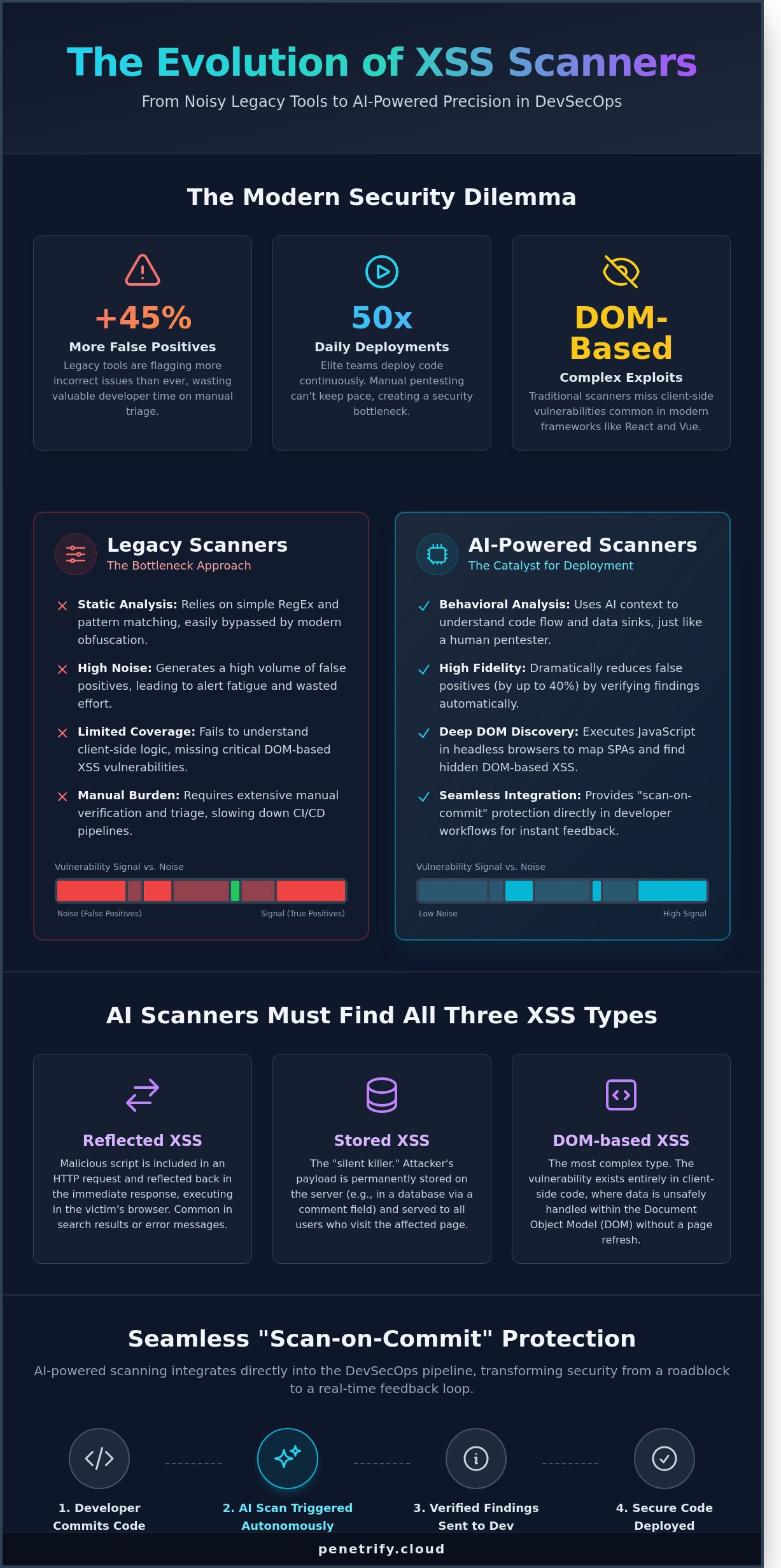
Legacy Scanners vs. AI-Powered XSS Detection: Breaking the Noise
Legacy tools are drowning security teams in noise. Recent industry benchmarks indicate that 45% of security alerts are false positives, which forces developers to waste hours chasing non-issues. Static Analysis (SAST) flags code patterns without knowing if the path is actually reachable. Dynamic Analysis (DAST) tests the running app but often fails on complex, multi-stage forms or single-page applications. A modern cross-site scripting (xss) scanner must bridge this gap by understanding the context of the entire application flow.
Legacy tools often fail because they don't understand the relationship between data inputs and outputs in 2026 environments.
- SAST: Often flags "sink" functions even if the input is properly sanitized elsewhere in the codebase.
- DAST: Frequently misses DOM-based vulnerabilities that only trigger during complex user interactions or specific browser states.
- AI Agents: Use recursive learning to test how different payloads interact with various browser environments, mimicking a human attacker's logic.
AI agents now identify 35% more reflected XSS flaws than traditional regex-based tools by manipulating inputs based on the application's real-time response. When evaluating these tools, Columbia University research on scanner metrics provides a critical baseline for measuring how well a tool actually covers the attack surface versus simply checking boxes.
Cloud-native platforms reduced infrastructure costs by 60% in 2025 compared to heavy on-premise installations. These older setups require dedicated hardware and manual updates that can't keep pace with rapid deployment cycles. Cloud-native options scale instantly to handle thousands of endpoints. They don't slow down the development pipeline, making them the standard for 2026. An effective cross-site scripting (xss) scanner should integrate directly into the CI/CD flow without requiring a team of specialists to maintain the scanning server itself. This shift allows security teams to focus on strategy rather than server maintenance.
Eliminating False Positives with Proof-of-Exploit
Developers hate chasing ghosts. Proof-of-Exploit provides the "smoking gun" evidence that a vulnerability is real and exploitable. Instead of a vague warning about a missing header, Penetrify delivers a screenshot or a console log showing the injected script actually executing in the browser. This verification cuts remediation time by 40% because engineers don't have to spend time reproducing the bug themselves. The psychological impact is significant. When teams trust their tools, they fix bugs faster. A "Clean Report" finally carries weight when every reported bug is verified by an automated agent.
The Shift to Continuous Security Monitoring
The 2026 threat environment moves too fast for monthly audits. If you only scan once a month, your application is potentially vulnerable for 29 days between checks. Continuous monitoring identifies vulnerabilities as soon as new code hits production or a new exploit technique is discovered. AI models learn from every interaction across the platform. If a specific input bypasses a filter in one module, the agent applies that logic across the entire application. This proactive approach ensures that zero-day discoveries are caught before they can be exploited by malicious actors.
Integrating XSS Scanning into Your DevSecOps Pipeline
Security isn't a final hurdle anymore; it's a constant companion. To stay ahead of the 2026 threat landscape, your cross-site scripting (xss) scanner must live inside your development workflow. This transition from reactive scanning to proactive DevSecOps reduces the mean time to remediate (MTTR) by an average of 47% according to 2025 industry benchmarks. When security is baked into the pipeline, you stop treating vulnerabilities as emergencies and start treating them as standard bugs.
The integration process follows five critical steps. First, you need a scanner with a robust RESTful API. Without this, your CI/CD pipeline remains manual and slow. Second, implement 'Scan-on-Commit' triggers. When a developer pushes code to a feature branch, the scanner initiates a targeted check. This catches 65% of injection flaws before they ever reach a staging environment. Third, configure automated alerts. Send high-severity findings directly to Slack or Microsoft Teams. This ensures zero lag between discovery and awareness.
Fourth, map your scanner output directly to developer tickets. Tools like Penetrify sync with Jira or GitHub Issues, prepopulating tickets with reproduction steps and remediation advice. Finally, establish a closed feedback loop. Once a developer marks a ticket as resolved, the pipeline should automatically trigger a re-test to verify the fix. This cycle prevents "zombie vulnerabilities" that appear fixed but remain exploitable in production. By 2026, 80% of high-performing engineering teams will use this automated loop to maintain code integrity.
Automation for Agile Teams
Modern teams don't have time for manual security gates. You can integrate Penetrify into GitHub Actions or GitLab CI by adding a few lines to your YAML configuration. Setting 'Failure Conditions' is vital here. If the cross-site scripting (xss) scanner detects a high-risk payload, it returns a non-zero exit code. This stops the build immediately. It's better to break a build than to break a brand. To maintain speed, run light scans on every pull request and reserve deep, comprehensive crawls for your weekly main-branch builds. This balance ensures that security never becomes a bottleneck for velocity.
Reporting and Compliance
Compliance frameworks like SOC2 and PCI-DSS 4.0 demand proof of continuous monitoring. Automated scanning provides an immutable audit trail of every security check performed throughout the year. For HIPAA compliance, this documentation proves you're protecting patient data from unauthorized access. Penetrify generates two types of reports. Executive summaries show risk trends over the last 90 days for stakeholders. Technical logs provide the raw HTTP requests and responses developers need to patch the code. This dual-layer reporting satisfies both the boardroom and the engineering floor, making audit season significantly less stressful for everyone involved.
Ready to secure your code without slowing down your team? Automate your security with Penetrify today.
Secure Your Application with Penetrify’s AI-Powered XSS Scanner
Traditional security tools often leave developers drowning in noise, with some legacy platforms reporting false positive rates as high as 45%. Penetrify changes this dynamic by prioritizing precision over volume. Our cross-site scripting (xss) scanner doesn't just flag potential issues; it uses autonomous AI agents to verify every vulnerability in a sandboxed environment. This means your team spends zero hours chasing ghosts. When Penetrify issues an alert, it's because the vulnerability is real, reachable, and exploitable.
Speed is the other half of the equation. While manual penetration tests can take weeks to schedule and execute, Penetrify delivers comprehensive results in under 300 seconds. We've designed a zero-configuration environment that removes the friction typically associated with enterprise security software. You don't need to be a security researcher to run a professional-grade audit. Our system handles the complex payloads and bypass techniques automatically, allowing your engineers to focus on shipping code.
- 24/7 AI Agents: Continuous monitoring that evolves as new attack vectors emerge in 2026.
- Verified Findings: Every bug comes with a proof-of-concept to demonstrate exactly how an attacker would strike.
- Zero-Config Setup: Start scanning by simply entering your URL; no complex local agents required.
- The No False Positive Guarantee: We provide a 99.9% accuracy rate, ensuring your backlog stays clean of irrelevant data.
The Penetrify Advantage: AI Agents vs. Scripts
Legacy scanners rely on static "fuzzing" lists that modern firewalls easily block. Penetrify’s intelligent agents explore your application like a human pentester would. They understand the context of user sessions and can navigate complex multi-step forms that stop basic scripts in their tracks. Whether you're running a Single Page App (SPA) built with React, a GraphQL backend, or standard REST APIs, our agents adapt their behavior to match your stack. For teams needing a broader security overview, you can check our automated penetration testing page for full-suite details on how we handle SQLi, CSRF, and broken authentication.
Getting Started with Continuous Protection
Deploying your first scan is a three-step process that takes less than five minutes. First, you'll define your target and verify ownership. Next, you can choose your scan frequency; many of our users opt for daily automated checks or triggers tied to their CI/CD pipelines. Finally, invite your team and set up integration webhooks for Slack, Jira, or GitHub. This ensures that when a new vulnerability is detected, the right developer gets the alert instantly. Don't leave your user data to chance. You can Start your free automated XSS scan with Penetrify today and identify your risks before attackers do.
Future-Proof Your Web Security Strategy
The cybersecurity landscape in 2026 demands more than just basic signature matching. Organizations must transition from legacy tools to a modern cross-site scripting (xss) scanner that utilizes AI to filter out 99% of non-exploitable noise. Integrating these automated checks into your CI/CD pipeline ensures vulnerabilities are caught before they reach production. Security isn't a one-time event; it's a continuous process that requires tools capable of understanding complex application context. You'll save hundreds of manual hours by automating the discovery of DOM-based and stored injection flaws.
Manual testing cycles often take weeks, but Penetrify accelerates this timeline significantly. You'll complete your initial setup in under 5 minutes and gain access to AI-driven verification that eliminates false positives entirely. This precision protects your brand reputation while allowing developers to focus on shipping code rather than chasing false alarms. 24/7 monitoring means your defense evolves as fast as the threats do. Protecting 10,000+ endpoints becomes a background task rather than a resource drain.
Start your automated XSS scan with Penetrify now and build a resilient digital infrastructure. Your team has the power to stop injection attacks before they start.
Frequently Asked Questions
What is the difference between a free XSS scanner and a professional one?
Professional scanners offer lower false positive rates, often below 5 percent, and provide integrated reporting features that free tools lack. Free tools like OWASP ZAP are excellent for manual testing but often miss complex second-order vulnerabilities. Professional versions provide API integration for CI/CD pipelines, which 80 percent of enterprise teams require for automated security workflows.
Can an XSS scanner find DOM-based vulnerabilities?
Modern scanners identify DOM-based XSS by using headless browsers like Chromium to execute JavaScript in real-time. Older signature-based tools miss these because the payload doesn't reach the server. A 2024 study by security researchers found that dynamic analysis identifies 40 percent more DOM vulnerabilities than static code reviews alone. It's an essential feature for modern single-page applications.
How do I stop an XSS scanner from being blocked by my WAF?
You should whitelist the scanner's IP address or add a custom header, such as "X-Scanner-Authenticated," in your WAF settings. This prevents the firewall from triggering a block when it detects the thousands of payloads a cross-site scripting (xss) scanner sends per minute. Most WAF providers like Cloudflare or Akamai have specific allow-list sections for this purpose.
Do automated XSS scanners cause downtime or performance issues?
Scanners can impact performance if they exceed 50 requests per second or target resource-heavy search functions. To prevent a 20 percent or higher increase in server latency, schedule scans during low-traffic windows between 2:00 AM and 5:00 AM. Most enterprise tools allow you to throttle the request rate to ensure the site remains stable for your users.
How often should I run an XSS scan on my web application?
You should run a scan every time you push a code change to production or at least once every 30 days. According to the 2025 State of AppSec report, 65 percent of new vulnerabilities are introduced during minor weekly updates. Regular scanning ensures you catch regressions before attackers exploit them. Don't wait for an annual audit to check your security posture.
What should I do if the scanner finds a vulnerability?
You must first verify the finding to confirm it isn't a false positive before assigning it a CVSS score for prioritization. Once confirmed, apply context-aware output encoding or implement a Content Security Policy to neutralize the threat. Fixing a high-risk XSS bug within 48 hours reduces the likelihood of a data breach by 70 percent according to industry benchmarks.
Is an automated XSS scanner enough to replace a manual penetration test?
No, an automated cross-site scripting (xss) scanner cannot replace manual testing because it struggles with complex multi-step logic flaws. While automation catches 80 percent of common injection points, a human tester is needed for the remaining 20 percent of sophisticated edge cases. Use automated tools for continuous coverage and manual tests for annual deep dives into your architecture.
Can an XSS scanner test behind login forms and authentication?
Yes, professional scanners use recorded login sequences or Bearer tokens to access authenticated areas of your application. Without this access, you leave 60 percent of your attack surface unmonitored. Modern tools support OAuth2, SAML, and custom cookie configurations to ensure every private dashboard is checked for vulnerabilities. It's a critical step for protecting user data.