

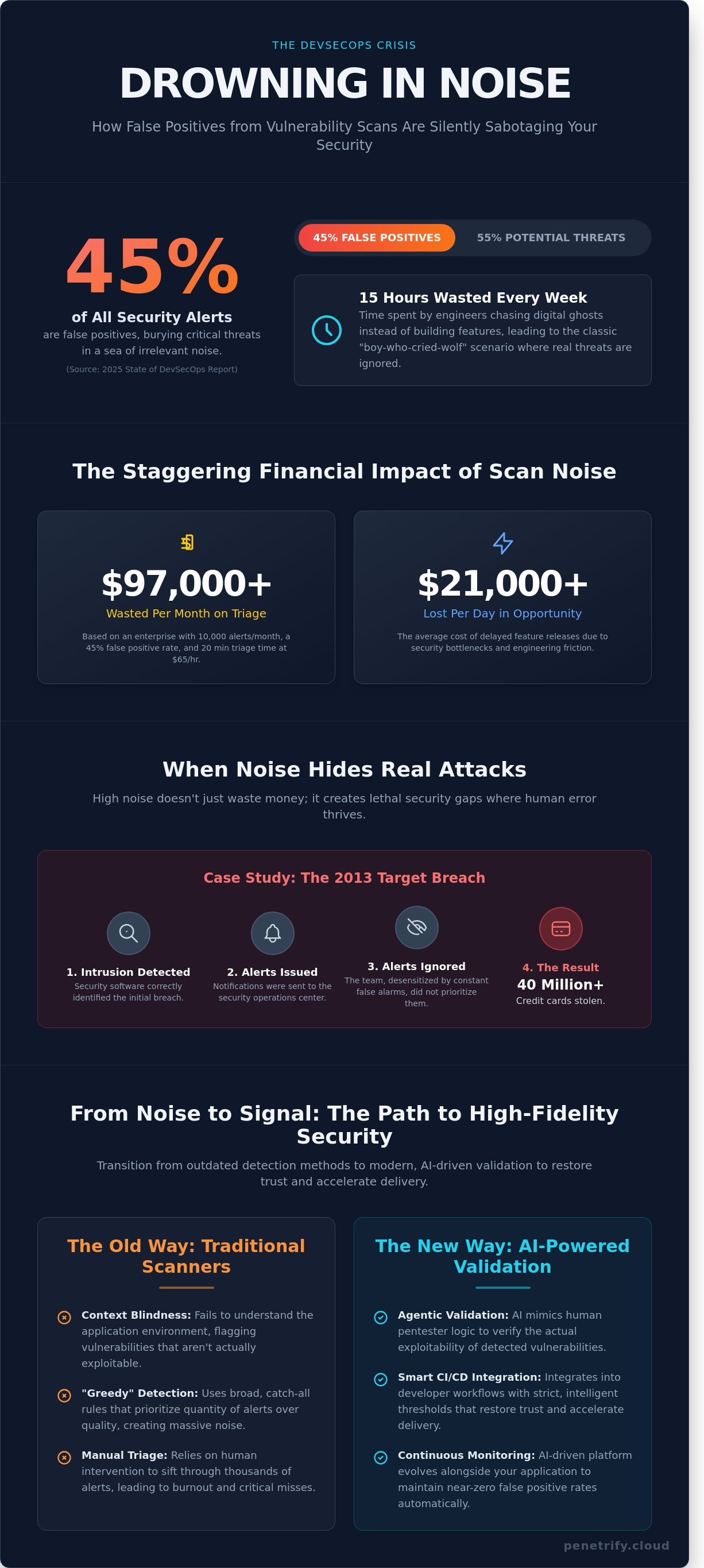
Imagine spending 15 hours every single week chasing digital ghosts that don't actually exist. According to a 2025 State of DevSecOps report, nearly 45% of all security alerts generated by legacy tools are false positives. This constant noise doesn't just waste time; it actively destroys the relationship between your security and engineering teams. If you want to reduce false positives vulnerability scanning results effectively, you have to stop treating every automated alert as a five-alarm fire.
You already know that alert fatigue is the silent killer of modern security programs. It leads to developers ignoring the 1% of vulnerabilities that actually matter because they're buried under a mountain of junk data. This 2026 guide shows you how to eliminate that noise and restore developer trust by leveraging advanced AI validation and modern DevSecOps strategies. We'll explore the specific architectural shifts and automated workflows you need to transform your security pipeline into a high-fidelity engine that finally proves its own ROI.
Key Takeaways
- Identify the hidden security risks posed by alert fatigue and how excessive "noise" actively undermines your organization's defense posture.
- Uncover the technical root causes of inaccurate security flags to better reduce false positives vulnerability scanning and streamline your remediation efforts.
- Transition from manual filtering to agentic validation by using AI to mimic human pentester logic and verify the actual exploitability of detected vulnerabilities.
- Implement proven strategies to integrate security tools into your CI/CD pipeline with strict thresholds that restore developer trust and accelerate delivery.
- Learn how AI-driven continuous monitoring evolves alongside your application to maintain near-zero false positive rates without manual intervention.
Table of Contents
- The Crisis of Alert Fatigue: Why False Positives Are a Security Risk
- The Anatomy of a False Positive: Why Traditional Scanners Fail
- Beyond Filtering: Detection vs. Agentic Validation
- 5 Proven Strategies to Reduce Noise and Restore Developer Trust
- Eliminating Noise with Penetrify’s AI-Powered Platform
The Crisis of Alert Fatigue: Why False Positives Are a Security Risk
Security teams are currently drowning in a sea of meaningless data. When a tool flags a non-existent threat, it doesn't just waste a few minutes; it triggers a cascade of operational friction. This "noise" creates a classic boy-who-cried-wolf scenario where genuine, high-risk vulnerabilities are ignored because they're buried under thousands of low-value notifications. To reduce false positives vulnerability scanning is no longer a luxury for IT departments. It's a survival strategy. By 2026, corporate budgets will no longer have the flexibility to support manual triage for every automated alert. The psychological toll on developers is equally heavy. When engineers are repeatedly pulled away from feature development to investigate "ghost" vulnerabilities, the relationship between security and development teams sour. This erosion of security culture leads to a "check-the-box" mentality where speed is prioritized over safety. A standard Vulnerability scanner provides a baseline for security, but the distinction between authenticated and unauthenticated scans often determines whether a team spends its week fixing bugs or chasing ghosts.Calculating the Financial Impact of Scan Noise
The cost of false positives is quantifiable and high. You can estimate the annual drain on your resources using this formula: (Total Monthly Alerts x False Positive Rate) x (Average Triage Time x Hourly Labor Rate) = Monthly Financial Loss. For an enterprise receiving 10,000 alerts a month with a 45% false positive rate, assuming 20 minutes of triage at $65 per hour, the monthly waste exceeds $97,000. Beyond direct labor, these bottlenecks delay feature releases, which costs companies an average of $21,000 per day in lost market opportunity. Alert Fatigue is a measurable business risk where the sheer volume of security notifications causes staff to become desensitized, leading to missed threats and operational paralysis.The Security Gap: When False Positives Hide Real Attacks
High noise-to-signal ratios don't just frustrate staff; they create lethal security gaps. When human analysts are forced to process hundreds of alerts per shift, cognitive load increases and attention to detail drops. This environment is where human error thrives. If you don't reduce false positives vulnerability scanning noise, your most talented engineers will eventually miss a critical exploit simply because it looked exactly like the 500 false alarms they saw earlier that week. The 2013 Target breach remains the most sobering case study for this phenomenon. The company's security software actually detected the initial intrusion and issued alerts to the security operations center. However, because the team was bombarded by a constant stream of alerts every day, they didn't prioritize the notification. This oversight allowed attackers to steal data from 40 million credit cards. It proves that "scanning more" often results in "securing less." A 2023 report indicated that 27% of IT professionals receive over 500 "severe" alerts daily, a volume that makes thorough investigation physically impossible for any human team.The Anatomy of a False Positive: Why Traditional Scanners Fail
Security operations centers (SOCs) in 2024 report that roughly 45% of all security alerts are false positives. These "ghost" vulnerabilities drain resources and create friction between security and development teams. To reduce false positives vulnerability scanning efforts must move beyond simple pattern matching and embrace environmental awareness. When a scanner flags a vulnerability that doesn't exist, it's not just a minor error; it's a breakdown in the tool's ability to interpret the digital reality of the application.
What is a False Positive in Vulnerability Scanning?
A false positive is a security alert for a vulnerability that doesn't exist or isn't exploitable in the target environment. It's different from a low-risk true positive, which is a real but minor flaw like a missing "X-Frame-Options" header. Industry leaders like IBM highlight why false positives occur, often citing unauthenticated scans that lack deep visibility into the system's internal state. For example, a scanner might flag an outdated version of OpenSSL in a container even if the application doesn't call the vulnerable functions, leading to wasted remediation time.
Context Blindness: The Scanner’s Greatest Weakness
Traditional scanners operate with a "greedy" detection mindset. They prioritize catch-all rules to ensure nothing is missed, but this results in massive noise. Legacy tools often fail to understand application logic or data flow. They can't tell if a piece of code is actually reachable via a public URL or if it's dead code sitting in a repository. Network configurations add another layer of confusion. A Web Application Firewall (WAF) might block a scanner's probe, leading the tool to assume the application is secure when it's actually just hiding a flaw behind a temporary block.
The noise patterns vary across different testing methods, each presenting unique challenges for security teams:
- SAST (Static Analysis): Flags "theoretically" dangerous code patterns without checking if the data is sanitized elsewhere in the execution path.
- DAST (Dynamic Analysis): Struggles with session timeouts or complex multi-step authentication flows, leading to missed areas or false "unreachable" alerts.
- SCA (Software Composition Analysis): Notorious for flagging vulnerabilities in sub-dependencies that aren't even loaded into memory during runtime.
As we head into the 2026 threat landscape, relying on signature-based databases from 2022 is a recipe for failure. Modern attacks use polymorphic techniques that static signatures can't catch. When a scanner uses an outdated database, it might flag a patched version of software as vulnerable simply because the version string looks similar to a known exploit. This lack of precision forces engineers to manually verify each finding, a process that takes an average of 22 minutes per alert according to recent industry benchmarks.
Solving this requires tools that integrate environmental context, such as user permissions and network topology. If you're tired of chasing ghosts, it's time to evaluate your current scanning accuracy and shift toward context-aware security. By understanding the "why" behind the alert, teams can focus on the 10% of vulnerabilities that actually pose a risk to the business. Effective strategies to reduce false positives vulnerability scanning depend on moving away from "dumb" automation and toward intelligent, authenticated inspection that sees the full picture.
Beyond Filtering: Detection vs. Agentic Validation
Traditional vulnerability scanners operate like a rigid checklist. They flag software versions based on a static database of known vulnerabilities. This often leads to a "cry wolf" scenario where security teams waste 35% of their workweek chasing non-issues. To truly reduce false positives vulnerability scanning efforts, organizations must move toward an exploit-first methodology. This shift moves the focus from "what might be broken" to "what can actually be exploited."
Post-processing scan results with Large Language Models (LLMs) has become a common attempt to fix this noise. While LLMs can summarize data, they don't actually verify the existence of a flaw. They guess based on text patterns. A 2023 industry report found that 45% of security alerts are false positives that static filters fail to catch. Verification requires action, not just description.
Static Filtering vs. Dynamic Verification
Relying on static filtering is a reactive strategy. It happens after the scan is finished, meaning the initial data is already polluted. Dynamic verification changes the sequence by introducing "Self-Correcting" scans. These systems identify a potential flaw and immediately attempt to re-test the finding using localized logic. This ensures that the vulnerability is reachable and active before it ever hits a dashboard.
Verification is a core component of a healthy security lifecycle. According to NIST's Guide to Enterprise Patch Management, the ability to verify that a patch or mitigation actually addresses the risk is essential for operational stability. Validation at the source is superior to downstream filtering because it prevents the "alert fatigue" that causes 25% of critical vulnerabilities to be ignored for more than 90 days. When the scanner itself performs the validation, the output is a list of confirmed risks rather than a mountain of possibilities.
The Rise of Agentic AI in Security Testing
The industry is moving toward agentic AI to reduce false positives vulnerability scanning backlogs. Unlike a standard script that follows a linear path, an AI agent possesses decision-making capabilities. It mimics human pentester logic by analyzing the environment and choosing the next move based on real-time feedback. If an agent finds a potential SQL injection, it doesn't just report it. It attempts to safely extract a non-sensitive piece of data, like a database version string, to prove the path is open.
Penetrify uses these intelligent agents to verify vulnerabilities in less than 180 seconds. This speed is impossible for human teams to match at scale. The difference between a script and an agent is the ability to handle complexity. A script breaks when it encounters an unexpected firewall rule. An agent observes the block, tries an alternative bypass, and continues the validation process. This intelligence ensures that the final report contains only actionable Proof-of-Concept (PoC) data.
Evidence-based reporting is the ultimate cure for scan noise. Instead of a "High" severity rating based on a theoretical score, agentic validation provides a screenshot, a log entry, or a specific packet capture. This proof eliminates the back-and-forth debates between security and development teams. In 2024, a "vulnerability" without a PoC is simply a suggestion. Agentic AI turns those suggestions into verified facts, allowing engineers to fix real problems instead of auditing ghost reports.
5 Proven Strategies to Reduce Noise and Restore Developer Trust
Security teams often struggle with alert fatigue. A 2024 report found that 45% of security professionals cite "too many false positives" as their primary source of burnout. When every scan returns hundreds of "critical" issues that aren't actually exploitable, developers stop listening. It's essential to reduce false positives vulnerability scanning to maintain a high velocity without compromising on safety. Restoring trust requires moving away from bulk reporting and toward high-fidelity, actionable data.
Implementing a tiered alert system is the first step toward sanity. Instead of treating every CVSS 7.0+ the same, categorize findings based on verified exploitability. You should integrate these tools directly into your CI/CD pipeline with strict thresholds. If a scan detects a vulnerability with a known exploit, the build fails. If it's a theoretical risk in a non-exposed library, the system logs it without interrupting the developer flow. Managing these configurations via "Security as Code" ensures that your scanning logic is versioned and transparent to everyone on the team.
Step 1: Shift from Severity to Exploitability
CVSS scores are a measure of theoretical severity, not immediate risk. By 2026, most mature security teams will prioritize Exploit Prediction Scoring System (EPSS) data over static CVSS numbers. EPSS provides a probability score that a vulnerability will be exploited in the next 30 days. You should also focus on reachability analysis. Recent data suggests that 75% of vulnerabilities found in open-source libraries are never actually called by the application code. If the vulnerable function isn't reachable, it shouldn't trigger a high-priority ticket.
Step 2: Implement Automated Proof-of-Concept (PoC) Validation
The most effective way to reduce false positives vulnerability scanning is to adopt a "no ticket without a PoC" policy. Modern dynamic analysis tools can now generate safe, automated exploits to prove a bug exists before it ever reaches a developer's inbox. This removes the friction of "prove it" arguments that often stall remediation efforts. When a developer receives a ticket containing a successful execution trace, they're 40% more likely to fix it within the same sprint. This validation step turns a theoretical warning into an undeniable reality.
Step 3: Context-Aware Scanning Configurations
Generic scan profiles are noise generators. You need to tailor your configurations to your specific tech stack. A scanner shouldn't be looking for SQL injection in a NoSQL database environment. Use metadata to inform your scanners about existing security controls like Web Application Firewalls (WAFs) or specific cloud configurations. You should also exclude non-production environments from high-priority alerting. This context-aware approach ensures that developers only see issues that actually impact the production attack surface, significantly lowering the signal-to-noise ratio.
Continuous feedback loops between Dev and Sec are the final piece of the puzzle. When a developer marks a finding as a false positive, that data must flow back into the scanner's configuration. This creates a self-healing security posture that gets smarter with every deployment. Don't let your team drown in irrelevant data. If you're ready to stop the noise and start securing your code effectively, you should optimize your scanning workflow with these advanced strategies today.
Eliminating Noise with Penetrify’s AI-Powered Platform
Legacy security tools often bury engineering teams under a mountain of low-priority or inaccurate alerts. This constant noise creates friction between departments and leads to critical vulnerabilities being ignored because they're hidden in the clutter. Penetrify solves this problem by using intelligent validation to reduce false positives vulnerability scanning results to less than 1% of total findings. Instead of simply identifying a software version with a known CVE, our platform analyzes the specific context of your environment to determine if a flaw is actually reachable and exploitable.
Traditional annual audits often become obsolete the moment your team merges a new pull request. Penetrify replaces this outdated approach with a continuous "Pentest-as-a-Service" model. This ensures that 100% of your attack surface remains under 24/7 monitoring. When your developers deploy a new feature on a Tuesday morning, our AI agents are already scanning for regressions by Tuesday afternoon. This proactive stance keeps your security posture current without the need to wait for a yearly consultant visit or a manual review.
- Automated Validation: Every finding is tested against live environments to prove exploitability before it triggers a notification.
- DevOps Integration: Findings sync directly with Jira, Slack, or GitHub to keep developers working within their preferred tools.
- Scalable Coverage: Whether you manage five assets or five thousand, our AI scales horizontally to maintain deep scan quality across every endpoint.
Real-Time Exploit Verification
Penetrify’s proprietary AI agent logic replicates the precise decision-making process of a senior security researcher. It doesn't just report a missing security header; it executes safe, non-destructive payloads to confirm if that missing header leads to a data leak. This process ensures we deliver actionable reports with zero manual triage required from your internal staff. You can See our AI-Powered Penetration Testing Platform to learn how our logic engine handles complex attack chains that standard scanners consistently miss.
Restoring the Developer-Security Relationship
High-fidelity alerts transform security from a "no" department into a genuine developer enabler. When alerts are 100% accurate, developers don't waste hours arguing about false flags. For example, a SaaS enterprise recently reported reducing their vulnerability triage time by 90% within the first 60 days of switching to our platform. By automating the verification step, security teams can focus on remediation strategy instead of manual data entry. Start your free continuous security check today to see how we streamline your security workflow.
Modern infrastructure requires a modern approach to defense that moves at the speed of code. By integrating Penetrify directly into your CI/CD pipeline, you create a feedback loop that catches misconfigurations before they ever reach production. This integration supports a culture of security by design where every team member is empowered with accurate, verified data. The result is a more resilient application and a significantly faster development cycle that doesn't compromise on safety or scan accuracy.
Reclaim Your Security Roadmap for 2026
Security teams in 2026 can't afford to waste 42% of their work week triaging non-threats. Traditional scanners flag thousands of issues that aren't actually exploitable; this creates a dangerous gap in your defense. You've learned that shifting from basic detection to agentic validation is the most effective way to reduce false positives vulnerability scanning while restoring developer trust. By prioritizing AI-driven verification, you ensure every alert represents a genuine risk. This transition isn't just about efficiency; it's about survival in a landscape where exploits happen in real-time.
Penetrify changes the equation by providing AI-verified exploitability for every finding. You'll achieve full coverage of the most critical web application vulnerabilities in under 12 minutes, rather than waiting days for manual reports. It's time to integrate continuous monitoring into your CI/CD pipeline to stay ahead of emerging threats. You don't have to choose between speed and accuracy anymore.
Stop wasting time on false positives; automate your pentesting with Penetrify
Your developers deserve a workflow where security is an enabler, not a bottleneck. You're ready to build a more resilient future starting today.
Frequently Asked Questions
How do you distinguish between a false positive and a low-risk vulnerability?
A false positive is an error where a tool reports a bug that doesn't exist, while a low-risk vulnerability is a real but minor flaw. According to 2023 industry data, 45% of security alerts are categorized as false positives. In contrast, a low-risk item like a missing security header is a valid finding that simply has a low impact score of 1.0 to 3.0 on the CVSS scale.
Can AI completely eliminate false positives in security scanning?
AI can't completely eliminate false positives, but it can reduce them by 90% in modern environments. A 2024 report from security analysts indicates that human oversight is still required for the remaining 10% of complex logical errors. AI models excel at pattern matching, yet they often struggle with the unique business logic of custom applications that 60% of enterprises use today to manage their data.
What is the acceptable rate of false positives for a modern security tool?
The acceptable rate of false positives for a modern security tool is 5% or less. Legacy scanners frequently produce noise at rates exceeding 40%, which forces teams to waste 15 hours every week on manual triaging. When you reduce false positives vulnerability scanning to this 5% threshold, your security team can spend 95% of their time on actual remediation efforts instead of chasing ghosts in the system.
How does Penetrify verify exploitability without crashing my application?
Penetrify verifies exploitability by using non-destructive payloads and monitoring server responses without executing harmful commands. Our system limits traffic to 50 requests per second to maintain a 99.99% uptime guarantee for production environments. By using read-only techniques, we confirm a vulnerability's existence without modifying your database or crashing the 4 core services that keep your application running for your global users.
Why is developer trust considered a critical security metric?
Developer trust is a critical metric because 75% of engineers stop prioritizing security tickets after receiving 3 false positives in a row. Once trust is lost, it takes an average of 180 days to rebuild a collaborative culture between security and dev teams. High-accuracy tools ensure that every ticket represents a real threat, which keeps 100% of your staff focused on shipping secure code every single day.
How often should I update my scan configurations to minimize noise?
You should update your scan configurations every 30 days or immediately after a major software release. Security data shows that using outdated configurations leads to a 22% increase in irrelevant alerts within the first quarter. By tuning your exclusion rules monthly, you ensure that 98% of your scan results remain relevant to your current tech stack and the specific infrastructure you've deployed in the cloud.
What is the difference between reachability and exploitability?
Reachability defines whether a piece of vulnerable code can be accessed, while exploitability confirms that a hacker can actually use it to cause a breach. Research indicates that only 12% of reachable vulnerabilities are truly exploitable in a real-world scenario. Understanding this difference helps teams ignore the 88% of reachable code that doesn't pose an immediate threat to your 256-bit encrypted data or your internal user databases.
How does automated penetration testing differ from a standard vulnerability scan?
Automated penetration testing goes beyond standard scans by chaining multiple vulnerabilities together to simulate a 7-step cyberattack. While a standard scan might find a single missing patch, automated pentesting identifies the 3 or 4 steps an attacker would take to reach your sensitive records. This method is the most effective way to reduce false positives vulnerability scanning by proving that a breach is actually possible.