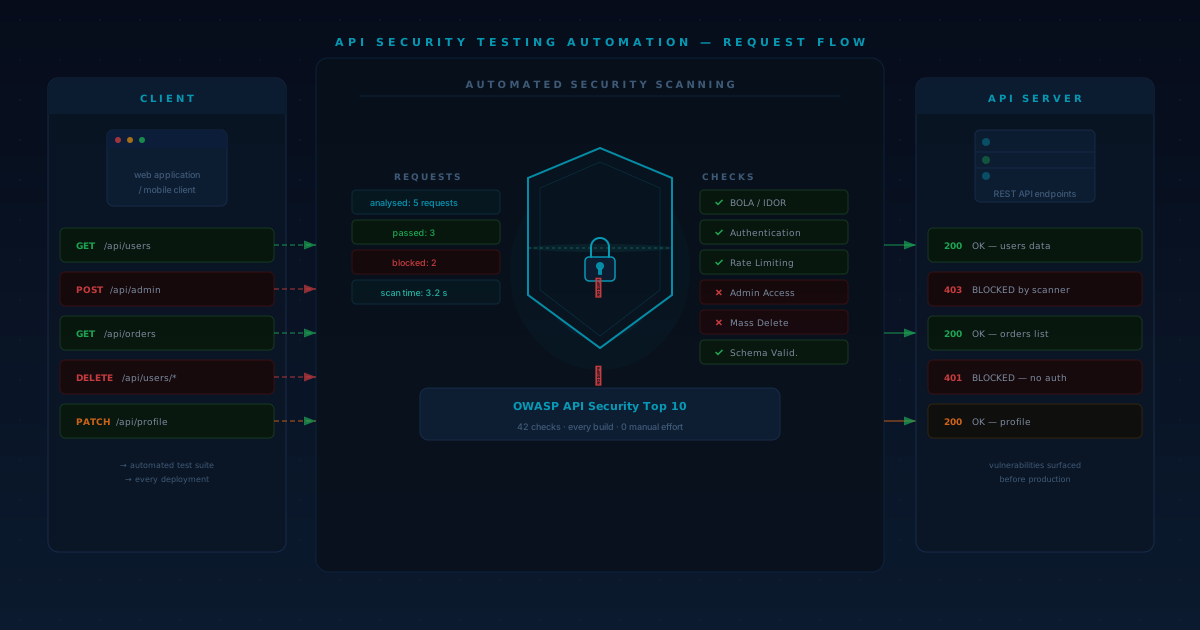
Moving your entire business infrastructure to the cloud feels a bit like moving houses, except you're moving into a glass skyscraper where the locks are digital and the burglars have infinite time to pick them. We’ve all heard the horror stories. A misconfigured S3 bucket leads to millions of customer records leaking. A developer leaves an API key in a public repository, and suddenly the company is footing a six-figure bill for unauthorized crypto mining.
Most organizations approach cloud migration with a focus on uptime and performance. They want to know if the database will sync correctly or if the latency will affect the user experience. These are important questions, but they often overshadow a much scarier reality: the security perimeter changes completely the moment you leave your on-premise servers. In a local data center, you "own" the walls. In the cloud, the walls are software, and software has bugs.
This is where proactive penetration testing becomes the literal difference between a successful digital transformation and a PR nightmare. It isn’t just about checking a box for your insurance provider. It’s about stress-testing your new environment before you go live. By simulating an attack while you're still in the transition phase, you can find the cracks in the foundation before any real damage is done. Platforms like Penetrify have made this process significantly easier by offering cloud-native testing that scales with your migration, but before we talk about tools, we need to understand why the cloud is such a unique beast for security teams.
The Shift in Responsibility: Understanding the Shared Responsibility Model
If you’re moving to AWS, Azure, or Google Cloud, you’ve likely come across the "Shared Responsibility Model." It sounds simple on paper, but in practice, it’s where many cloud migrations fail. The provider is responsible for the security of the cloud—the physical servers, the cooling, the hypervisors, and the networking hardware. You, the customer, are responsible for security in the cloud.
Where the Lines Get Blurry
Many teams assume that because they are using a world-class provider, their data is automatically safe. This is a dangerous misconception. The provider gives you the tools to build a secure environment, but they don't necessarily build it for you.
- Identity and Access Management (IAM): AWS won't stop you from giving "Admin" permissions to every single employee, even though it’s a terrible idea.
- Data Encryption: They provide the encryption tools, but if you don't turn them on or if you manage your keys poorly, your data sits in the clear.
- Application Logic: If your web application has a SQL injection vulnerability, the cloud provider's firewall might catch some of it, but the flaw still exists in your code.
The Role of Pen Testing in Clarifying Responsibility
Penetration testing helps you see exactly where your side of the bargain is failing. When you use a platform like Penetrify to run an assessment during migration, you aren't testing Amazon's data center; you're testing your configuration of their services. It’s a reality check that ensures your team hasn't left the digital back door wide open while they were busy focusing on data migration speeds.
Common Security Pitfalls During Cloud Migration
Migration is a chaotic time. You’re often running hybrid environments where the old on-premise system has to talk to the new cloud instances. This "middle state" is a goldmine for attackers. Here are the specific areas where things usually go wrong.
Misconfigured Storage Buckets
It’s the classic cloud security failure. An engineer creates a storage bucket to move some assets, sets it to "Public" so the migration script can access it easily, and then forgets to close it. Automated scrapers used by hackers find these buckets within minutes. Proactive pen testing specifically looks for these open "low-hanging fruit" vulnerabilities that automated scanners might miss if they aren't configured with the right context.
Excessive Permissions (IAM Over-Privilege)
In the rush to get things working, it’s tempting to give a service account "FullAccess." It solves the "Access Denied" errors immediately, but it creates a massive security hole. If that service account is ever compromised, the attacker has the keys to the entire kingdom. A pen test will simulate an identity compromise to see how far an attacker can move laterally with the permissions you've assigned.
Hardcoded Secrets
During the transition, developers might hardcode API keys, database passwords, or SSH keys into configuration files or scripts to speed things up. If these scripts are inadvertently pushed to a version control system or if an attacker gains access to one server, they can gain access to everything else.
Shadow IT and Ghost Instances
When you move to the cloud, it becomes incredibly easy for any department to spin up a new server. Without a centralized view, you might have "ghost" instances—old test servers that aren't patched, aren't monitored, but are still connected to your production network. Penetrify helps solve this by providing visibility across the entire cloud-native architecture, ensuring that no stone is left unturned during an assessment.
Why Legacy Pen Testing Fails in the Cloud
Traditional penetration testing often involves a consultant coming on-site, plugging a laptop into your network, and running tests for a week. They give you a PDF report two weeks later, and by the time you read it, your cloud environment has already changed twenty times.
The Problem with "Point-in-Time" Testing
The cloud is dynamic. You might spin up fifty containers in the morning and kill them by the afternoon. An annual or even quarterly pen test can’t keep up with that pace of change. If you only test once, you’re only seeing a snapshot of a moving target.
Infrastructure as Code (IaC) Requires a New Approach
In the cloud, your infrastructure is defined by code (Terraform, CloudFormation, etc.). This means security needs to be part of the "build" process. You need a testing solution that understands cloud logic—things like VPC peering, security group rules, and serverless functions. Legacy tools often treat cloud instances like standard physical servers, missing the unique ways cloud-specific services can be exploited.
The Need for Scalability
If you’re a mid-market company migrating a hundred applications, you can't wait for a manual tester to check each one manually. You need a hybrid approach. This is why cloud-native platforms are becoming the standard. They allow for automated scanning to handle the bulk of the work while focusing manual expertise on the high-risk areas. This ensures your security assessment scales at the same rate as your migration.
How to Integrate Pen Testing into Your Migration Roadmap
You shouldn't wait until the migration is finished to start testing. By then, the architecture is baked in, and fixing a fundamental security flaw might require a complete rebuild. Instead, adopt a "Shift Left" mentality.
Phase 1: Pre-Migration Architecture Review
Before you move a single byte of data, use your pen testing partner or platform to review your planned cloud architecture. Are the VPCs properly isolated? Is the IAM logic sound? Catching a design flaw now is 100x cheaper than fixing it later.
Phase 2: The Pilot Phase
When you move your first "low-stakes" application, run a penetration test. This serves as a litmus test for your security controls. If the pen test finds major issues in a simple app, it’s a sign that your underlying cloud foundation needs work before you move the crown jewels.
Phase 3: The Production Push
As you move your core databases and customer-facing apps, you need continuous or high-frequency testing. This is where the cloud-based delivery model of Penetrify shines. Because there’s no hardware to install, you can trigger assessments on-demand as new production environments come online.
Phase 4: Post-Migration Hardening
Once the migration is "finished" (though cloud environments are never truly finished), you transition into a cycle of regular assessment. This ensures that as your developers add new features or adjust the infrastructure, they aren't accidentally introducing new vulnerabilities.
The Financial Case for Proactive Security
Whenever security is discussed, the conversation eventually turns to the budget. It’s easy to view pen testing as an "extra" cost. However, when you look at the economics of a data breach, the math changes quickly.
Avoiding the "Fire Drill" Cost
If you find a vulnerability during a pen test, you can fix it on your own schedule with your internal team. If a hacker finds it, you’re paying for forensic investigators, legal counsel, PR firms, and potential regulatory fines. The cost of a proactive assessment is a fraction of the cost of a reactive cleanup.
Compliance and Insurance
If you operate in a regulated industry—healthcare (HIPAA), finance (PCI-DSS), or any business dealing with EU citizens (GDPR)—regular security assessments aren't optional. Failing to prove that you’ve done "due diligence" during a cloud migration can lead to massive fines. Furthermore, cyber insurance providers are increasingly requiring proof of regular penetration testing before they will issue or renew a policy.
Operational Efficiency
By using a cloud-native platform like Penetrify, you reduce the "CapEx" (Capital Expenditure) of security. You don't need to buy specialized hardware or hire a massive team of full-time security researchers just to handle the migration peak. You can scale your testing resources up when you’re busy moving data and scale them down once you’ve reached a stable state.
Step-by-Step Guide: Conducting Your First Cloud Pen Test
If you’ve never run a cloud-focused pen test, the process might seem opaque. Here is a breakdown of how a typical engagement should look when you’re using a modern platform.
Step 1: Scoping the Assessment
You need to define what’s "in bounds."
- Will you be testing just the external-facing IPs?
- Will you give the testers internal access to see if they can move between VPCs?
- Are serverless functions (like AWS Lambda) included? Documentation is key here. In the cloud, it's easy to accidentally scan an IP that doesn't belong to you (e.g., a shared service from the provider), so precise scoping is vital.
Step 2: Informing the Cloud Provider
In the past, you had to ask for permission from AWS or Azure before running a pen test. Today, most major providers have a "Permanent Pen Test Policy" for common services. However, you still need to check the current rules for high-intensity tests like DDoS simulations. Platforms that specialize in cloud testing usually handle the technical guardrails to ensure you stay within the provider's Terms of Service.
Step 3: Execution - The "Red Team" Approach
The testers (or the automated platform) will begin by footprinting your environment. They look for exposed ports, unpatched services, and misconfigured permissions. They will try to escalate privileges—starting as a low-level user and trying to become a Global Admin.
Step 4: Vulnerability Analysis & Reporting
This is the most critical part. A list of 500 vulnerabilities is useless if you don't know which ones matter. A good report should categorize findings by:
- Severity: How easy is it to exploit?
- Impact: How much damage can it do?
- Remediation: Exactly how do we fix it? (e.g., "Change the S3 bucket policy to X" rather than just saying "Bucket is open.")
Step 5: Remediation and Re-testing
Once the report is in, your IT team gets to work. But the job isn't done until you re-test. You need to prove that the "fix" actually worked and didn't accidentally open a different hole.
Comparison: Automated Scanning vs. Manual Penetration Testing
A common question is: "Can't I just use a vulnerability scanner?" The answer is that you need both, and understanding the difference is key to a secure migration.
| Feature | Automated Scanning | Manual Penetration Testing |
|---|---|---|
| Speed | Extremely fast, can run daily. | Slower, usually takes days or weeks. |
| Depth | Finds known bugs and missing patches. | Finds complex logic flaws and "chains" vulnerabilities. |
| False Positives | High; often flags things that aren't actually risks. | Low; a human verifies the flaw is real. |
| Cost | Relatively low. | Higher due to human expertise required. |
| Context | Doesn't understand why a system is set up a certain way. | Understands your business logic and specific risks. |
The Penetrify Advantage: Most businesses find the sweet spot in a hybrid model. Use automation to keep a baseline of security across your entire cloud footprint, and use manual experts for your most sensitive applications. A cloud-native platform allows you to manage both in one place.
Common Mistakes to Avoid During Your Security Assessment
Even with the best intentions, companies often trip up when they start pen testing their cloud environments.
1. Waiting Until "Go-Live"
I’ve seen companies schedule a pen test for the Friday before a Monday launch. When the report comes back with "Critical" findings at 6:00 PM on Friday, the launch is either delayed (expensive) or the company goes live with a known hole (dangerous). Give yourself at least a two-week buffer for remediation.
2. Testing the Wrong Environment
Don't just test your "Staging" environment if it isn't an exact replica of "Production." If Staging doesn't have the same firewall rules or IAM policies, the test results are effectively useless for protecting your real customer data.
3. Ignoring the "Low" and "Medium" Risks
Attackers often "chain" vulnerabilities. They might use a "Low" risk info-leak to find a username, then use a "Medium" risk misconfiguration to gain access to a low-level account, and finally use a "High" risk flaw to become an admin. If you only fix the "Criticals," you're still leaving the path open for a patient attacker.
4. Forgetting the Human Element
Your cloud is only as secure as the people managing it. Social engineering (phishing for cloud credentials) is a major part of modern attacks. Ensure your pen test includes an assessment of your identity providers (like Okta or Azure AD) and MFA (Multi-Factor Authentication) implementation.
How Penetrify Simplifies Cloud-Native Security
When we talk about making professional-grade security accessible, we mean removing the friction that stops companies from doing it right. Penetrify was built specifically for the modern IT environment.
Deployment Without the Headache
Because it’s cloud-native, you don't need to ship hardware to a data center or install complex agents on every single virtual machine. You can connect your environment and start identifying weaknesses almost immediately. This is a game-changer for companies in the middle of a fast-paced migration who don't have time for a three-week setup process.
Visibility Across the Spectrum
Whether you are using a single cloud, a multi-cloud strategy (AWS + Azure), or a hybrid model (Cloud + On-prem), you need a "single pane of glass." Penetrify provides a comprehensive view of your security posture. You won't have to jump between five different tools to understand if your business is safe.
Actionable Remediation Guidance
The platform doesn't just hand you a list of problems. It provides clear guidance on how to fix them. For an IT department that might be new to cloud security, this is like having a subject matter expert sitting next to them. It speeds up the remediation process and ensures that the migration stays on track.
Continuous Monitoring
Cybersecurity isn't a "one and done" task. New vulnerabilities (like Log4j) are discovered constantly. Penetrify’s ability to provide continuous monitoring means you are protected against today's threats, not just the ones that existed when you first migrated.
Real-World Scenario: The E-Commerce Migration
Imagine a retail company moving their customer database and checkout system from a local server to the cloud to handle Black Friday traffic.
During the migration, the developers create a "Lambda" function to process payments. To make sure it can talk to the database, they give it a very broad IAM role. They also set up a staging database and populate it with real customer data for testing, but they forget to enable encryption at rest for that specific instance.
A standard vulnerability scanner might see that the servers are "patched." But a proactive pen test through Penetrify would flag two critical issues:
- The Over-privileged Lambda: A tester could show how an attacker who compromises the web front end could use that Lambda function to wipe the entire database.
- The Unencrypted Staging Data: The tester would identify that the staging database is accessible via a misconfigured VPC peering connection.
By catching these during the migration, the retail company avoids a catastrophic data breach during their busiest sales week of the year.
Checklists for a Secure Cloud Migration
To help you stay on track, here are two checklists: one for your architecture and one for your pen testing strategy.
Architectural Security Checklist
- MFA Everywhere: Is Multi-Factor Authentication required for every user accessing the cloud console?
- Least Privilege: Do your service accounts have the absolute minimum permissions required?
- Encryption: Is data encrypted at rest (in S3/RDS) and in transit (HTTPS/TLS)?
- Logging: Is CloudTrail or an equivalent logging service turned on and sending data to a secure, immutable bucket?
- Network Segmentation: Are your databases in private subnets with no direct internet access?
Pen Testing Readiness Checklist
- Define the Goal: Are you testing for compliance, or are you trying to see if a hacker can steal your specific IP?
- Prepare the Team: Ensure your IT team is ready to respond to the findings.
- Check the Provider Rules: Confirm your testing plan doesn't violate your cloud provider's terms.
- Schedule a Re-test: Budget time and resources to verify the fixes after the first round of testing.
Frequently Asked Questions
1. How often should we pen test our cloud environment?
Ideally, you should conduct a deep-dive pen test annually or whenever you make a major architectural change (like a migration). However, you should use automated scanning and continuous monitoring monthly or even weekly to catch "low-hanging fruit" vulnerabilities.
2. Does pen testing cause downtime?
A professional pen test is designed to be non-disruptive. Testers use controlled methods to identify vulnerabilities without crashing your services. However, it’s always a good idea to perform these tests in a "Pre-Production" environment that mirrors your live setup if you are worried about stability.
3. What is the difference between a vulnerability assessment and a pen test?
A vulnerability assessment is a broad scan that looks for "known" holes (like unpatched software). A penetration test is a targeted, active attempt to exploit those holes to see how deep an attacker can go. Think of a vulnerability assessment as checking if the doors are unlocked; a pen test is trying to actually break in and get to the safe.
4. My cloud provider already has security tools like GuardDuty or Inspector. Why do I need Penetrify?
Cloud native tools like GuardDuty are great for detecting an attack that is already happening. Penetrify is a proactive tool that helps you find and fix the holes before an attacker can use them. They are complementary—you need detection, but you also need prevention.
5. Is Penetrify suitable for small businesses?
Yes. One of the main goals of the platform is to make professional-grade testing accessible. Because it’s cloud-based and scalable, it’s affordable for smaller companies that don't have a million-dollar security budget but still face the same threats as the big players.
Conclusion: Don't Leave Your Security to Chance
Cloud migration is a massive opportunity for your business to become faster, more agile, and more scalable. But if you move your "old" security mindset to the "new" cloud, you’re setting yourself up for failure. The cloud requires a proactive, dynamic, and native approach to security.
By integrating penetration testing early and often—using platforms like Penetrify—you turn security from a roadblock into a competitive advantage. You can move fast, knowing that your infrastructure has been battle-tested against real-world attack scenarios.
The best time to secure your cloud was during the design phase. The second best time is right now. Don't wait for a notification from a researcher (or a ransom note from a hacker) to find out where your vulnerabilities are. Take control of your security posture, protect your customer data, and ensure your cloud migration is a success for the right reasons.
Ready to see where your cloud's weak points are? Start a conversation with your security team today about how proactive testing can fit into your next migration phase. Whether you're moving your first app or managing a massive global footprint, staying one step ahead of the threat is the only way to operate in the modern digital age.