
API Security Testing Automation: The Complete Guide for 2026
APIs are under siege. With 84% of organizations reporting API security incidents in the past year and the API security testing market projected to hit $14.68 billion by 2033, the question is no longer whether you need automated API security testing — it's how fast you can implement it.
Manual penetration testing finds deep logic flaws, but it can't keep pace with modern release cycles. Teams shipping multiple times per day need security checks that run in minutes, not weeks. That's where API security testing automation comes in: systematic, repeatable vulnerability detection woven directly into your development workflow.
This guide walks through why automation matters now, what to test for, how to integrate it into your CI/CD pipeline, and how to choose the right approach for your team.
Penetrify homepage — AI-powered penetration testing
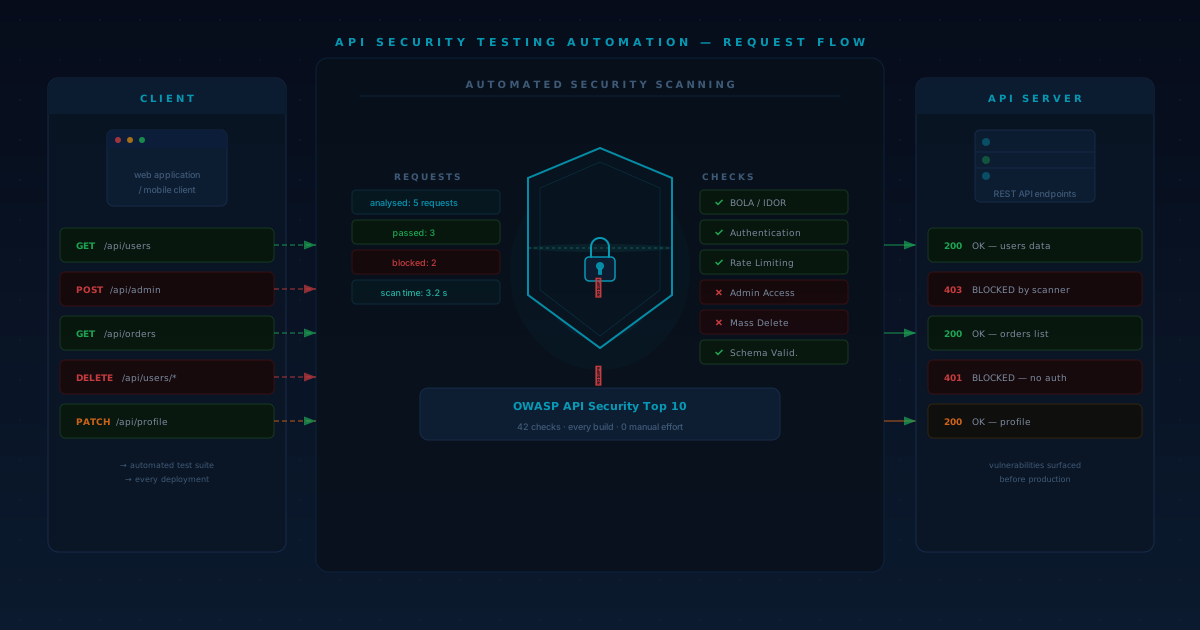
Why Manual API Security Testing Alone No Longer Works
Traditional API penetration testing operates on a point-in-time model. A security team or external consultant tests your APIs every quarter — or, more realistically, once a year. Between those assessments, every code change, every new endpoint, and every modified authentication flow goes untested.
The math doesn't work. A mid-size engineering team might push 50–200 changes per week across dozens of API endpoints. Manual testing covers a snapshot; automation covers the entire surface continuously.
There are three core limitations of purely manual approaches. First, coverage gaps are inevitable. New endpoints go live without any security review. Second, the feedback loop is too slow. Developers learn about vulnerabilities weeks after writing the code, which makes fixes more expensive and context harder to recall. Third, it doesn't scale. As API surface area grows, manual testing costs grow linearly — or you accept less coverage.
Automated API security testing addresses all three. It runs against every build, catches regressions immediately, and scales with your codebase at near-zero marginal cost per test run.
That said, automation isn't a replacement for manual testing. It's a force multiplier. Automated scans handle the OWASP API Top 10 checklist, known vulnerability patterns, and regression checks. Human testers focus on business logic flaws, complex multi-step attack chains, and creative exploitation — the work that actually requires human reasoning.
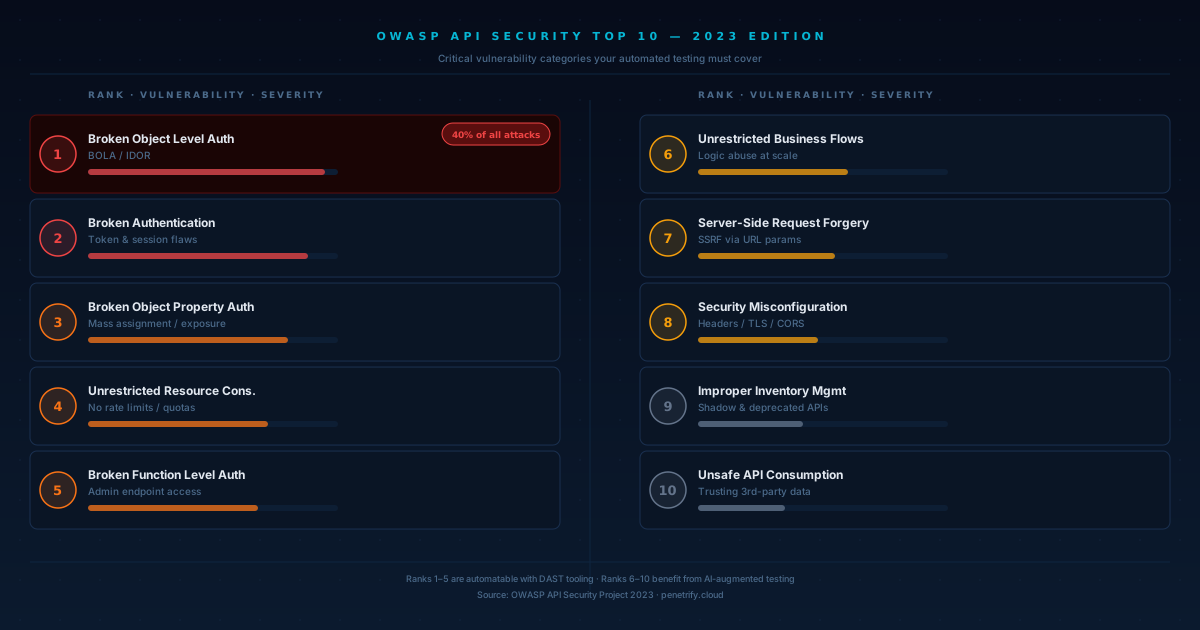
The OWASP API Security Top 10: What Your Automation Must Cover
The OWASP API Security Top 10 (2023 edition) defines the most critical API vulnerability categories. Any automated testing strategy should cover these systematically.
Broken Object Level Authorization (BOLA)
BOLA has held the number-one spot since OWASP first published the API list in 2019. It accounts for roughly 40% of all API attacks. The vulnerability occurs when an API endpoint accepts an object identifier (like a user ID or order number) and doesn't verify that the requesting user has permission to access that specific object.
Automating BOLA detection requires sending requests with one user's credentials but another user's object identifiers. Your test harness needs at least two authenticated sessions to cross-reference access.
Broken Authentication
Flawed authentication mechanisms let attackers compromise tokens, keys, or passwords to assume other users' identities. Automated tests should verify token expiration, brute-force protections, credential stuffing resistance, and proper session invalidation.
Broken Object Property Level Authorization
This is a newer entry in the 2023 list, combining the previous "Excessive Data Exposure" and "Mass Assignment" categories. APIs that return too many object properties — or allow clients to set properties they shouldn't — create exploitable attack surface. Automated testing should compare response schemas against expected contracts and attempt unauthorized property modifications.
Unrestricted Resource Consumption
APIs without rate limiting or resource quotas are vulnerable to denial-of-service attacks. Automated tests should verify that rate limits are enforced, large payloads are rejected, and pagination is required for bulk endpoints.
Broken Function Level Authorization
Similar to BOLA but at the function level — users accessing admin endpoints, for example. Automation should systematically test every endpoint with different privilege levels to verify access control enforcement.
The Remaining Five
Server-Side Request Forgery (SSRF), Security Misconfiguration, Unsafe Consumption of APIs, Improper Inventory Management, and Unrestricted Access to Sensitive Business Flows round out the top 10. Each maps to specific automated test patterns: SSRF payloads in URL parameters, configuration checks against hardening baselines, input validation on third-party data, shadow API discovery scans, and rate/flow analysis for business-critical operations.
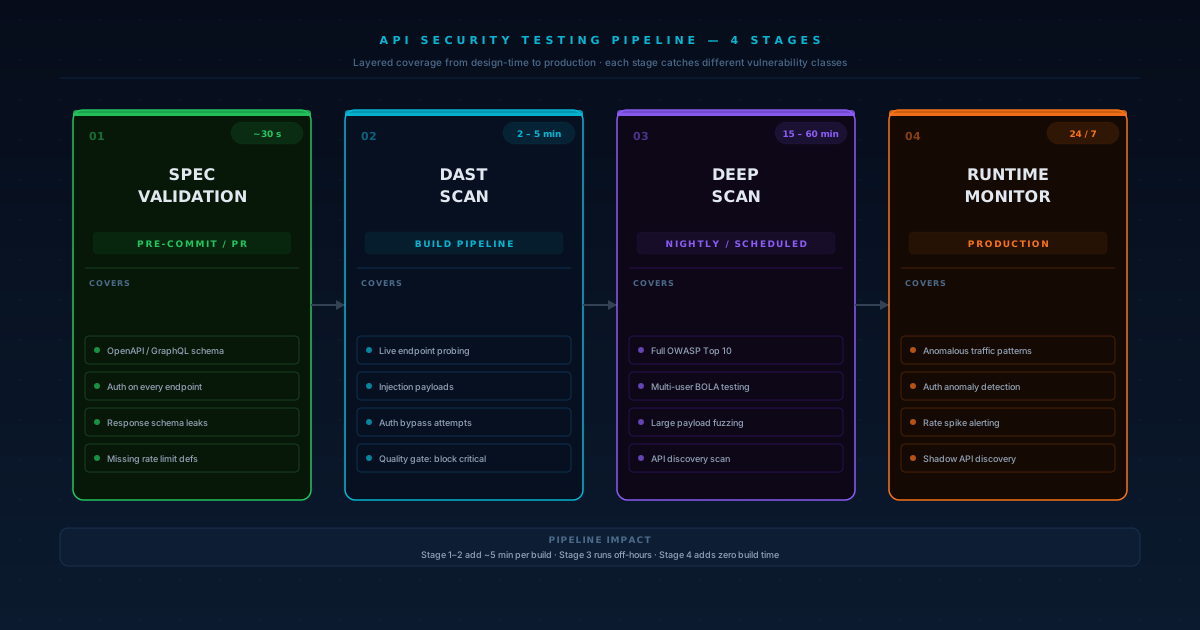
Building Your API Security Testing Pipeline
The most effective approach layers multiple testing stages across your CI/CD pipeline. Each stage serves a different purpose and catches different vulnerability classes.
Stage 1: API Specification Validation (Pre-Commit / PR Gate)
Before any code reaches your main branch, validate your OpenAPI or GraphQL schema against security rules. This catches issues at the design level: missing authentication requirements, overly permissive schemas, undocumented endpoints, and insecure default configurations.
Tools like 42Crunch run 300+ checks against OpenAPI specs and integrate as PR checks. This stage adds negligible time (under 30 seconds) and catches design-level security issues before a single line of implementation code is written.
What to check at this stage: authentication defined on every endpoint, input validation constraints on all parameters, response schemas that don't leak internal fields, and proper error response definitions that don't expose stack traces.
Stage 2: Dynamic Application Security Testing (Build Pipeline)
Once the API is running in a test environment, DAST tools probe live endpoints for runtime vulnerabilities. This is where you catch injection flaws, authentication bypasses, and authorization failures that only manifest in running code.
Modern DAST tools accept your OpenAPI spec as input so they know the full API surface, then generate attack payloads automatically. A typical scan adds 2–5 minutes to your pipeline — fast enough for every PR, comprehensive enough to catch the most common vulnerability patterns.
Configure quality gates that block merges when critical or high-severity vulnerabilities are detected. Medium and low findings can be logged as issues for triage without blocking delivery.
Stage 3: Comprehensive Scans (Nightly / Scheduled)
Deeper scans that take longer (15–60 minutes) should run on a schedule rather than on every commit. These include full OWASP Top 10 coverage, authenticated multi-user testing for authorization flaws, fuzzing with large payload sets, and performance-under-load testing.
Open-source tools like OWASP ZAP are excellent for this stage. ZAP's Docker and CLI support make CI/CD integration clean, and its active scan mode covers a broad range of vulnerability classes without licensing costs.
Stage 4: Continuous Monitoring (Production)
Post-deployment, runtime API monitoring watches for anomalous patterns: unusual parameter values, unexpected endpoint access sequences, authentication anomalies, and traffic spikes on sensitive endpoints. This isn't testing in the traditional sense — it's detection — but it closes the loop on vulnerabilities that made it through earlier stages.
Real-World Impact: What Happens Without Automated API Security
The consequences of neglecting API security automation aren't theoretical. In recent years, some of the most damaging data breaches have traced back to API vulnerabilities that automated testing would have caught.
Dell experienced a breach that exposed 49 million customer records through API vulnerabilities that mapped directly to the OWASP API Top 10. Trello's 2024 breach leaked user data through a BOLA vulnerability — the exact category that sits at number one on the OWASP list and is among the easiest to detect with automated multi-user testing.
The pattern repeats across industries. An API endpoint goes live without proper authorization checks. Nobody tests it because the security team's quarterly assessment isn't scheduled for another two months. An attacker discovers the endpoint through API enumeration, exploits the missing authorization, and exfiltrates data at scale.
Automated testing breaks this pattern. A DAST scan running on every deployment would flag the missing authorization check before the code reaches production. The developer fixes it while the context is still fresh — minutes after writing the code, not months later.
The financial impact extends beyond breach costs. Organizations that implement automated API security testing report significantly faster compliance audit preparation, reduced mean time to remediate vulnerabilities, and fewer emergency security patches disrupting planned work.
What to Automate (And What Not To)
Not every security test belongs in an automated pipeline. Understanding the boundary helps you allocate resources correctly and avoid a false sense of security.
Automate These
Known vulnerability patterns — injection (SQL, NoSQL, command), XSS via API responses, SSRF, and path traversal — are textbook automation candidates. The attack payloads are well-documented, and detection is deterministic.
Authentication and authorization checks are highly automatable. Set up test accounts at every privilege level, then systematically verify that each endpoint enforces the correct access controls. This catches the regressions that slip in when developers add new endpoints or modify existing ones.
Configuration compliance is another strong automation target. Check TLS versions, CORS headers, security headers, rate limiting, error handling, and cookie flags on every deployment.
Schema contract testing — verifying that API responses match their documented schemas and don't leak extra fields — catches the "Excessive Data Exposure" class of vulnerabilities automatically.
Rate limiting and resource consumption testing should be automated to verify that every endpoint enforces appropriate request limits, payload size restrictions, and pagination requirements. Without this, a single API call could trigger unbounded database queries or return massive datasets.
Keep These Manual (Or Use AI-Augmented Testing)
Business logic vulnerabilities resist pattern-based automation. A coupon code that can be applied twice, a race condition in a funds transfer, or an API flow that leaks information when steps are performed out of order — these require understanding the application's intended behavior.
Complex authorization models — especially those involving multi-tenancy, delegated access, or hierarchical permissions — often have edge cases that are difficult to express as automated test rules. A healthcare API might allow a doctor to view patient records, but only for patients they're actively treating, and only during specific timeframes. These contextual rules benefit from human review.
Third-party API integration security is another area where manual assessment adds value. When your API consumes data from external services, automated tools can check input validation, but evaluating whether you're placing appropriate trust in that data requires understanding the business relationship and data flow.
Multi-step attack chains where exploiting one vulnerability provides the foothold for exploiting another are difficult to automate with traditional tools. This is where AI-powered penetration testing platforms add significant value. By modeling attack paths rather than running isolated checks, AI-driven tools can discover chained exploits that individual scans would miss.
Compare Penetrify with other testing tools
Choosing the Right Tools
The API security testing tool market has matured significantly. Your choice depends on where in the pipeline you need coverage, your budget, and your existing toolchain.
For PR-Level Speed (Under 2 Minutes)
StackHawk and 42Crunch are purpose-built for CI/CD with native GitHub Actions, GitLab CI, and Jenkins plugins. They prioritize speed and developer experience — results appear as PR comments, not in a separate security dashboard that nobody checks.
For Comprehensive Coverage (Scheduled Scans)
OWASP ZAP remains the most widely used open-source DAST scanner for API security testing. It's free, extensible, and has a massive community maintaining its vulnerability detection rules. For teams that need more depth, commercial tools like Burp Suite Enterprise add authenticated scanning and more sophisticated detection.
For AI-Powered Autonomous Testing
The newest category uses AI to go beyond static rule sets. Rather than replaying known payloads, AI-powered platforms analyze your API's behavior, discover undocumented endpoints, generate context-aware test cases, and chain vulnerabilities together to demonstrate real attack paths. This approach bridges the gap between automated scanning and manual penetration testing.
Learn more about AI-powered penetration testing
Layered Approach (Recommended)
Most mature security programs use multiple tools in combination: a fast commercial scanner for PR gates, a comprehensive open-source tool for nightly deep scans, and an AI-powered platform for continuous autonomous testing that mimics real attacker behavior. This layered strategy maximizes coverage while keeping pipeline speed acceptable.
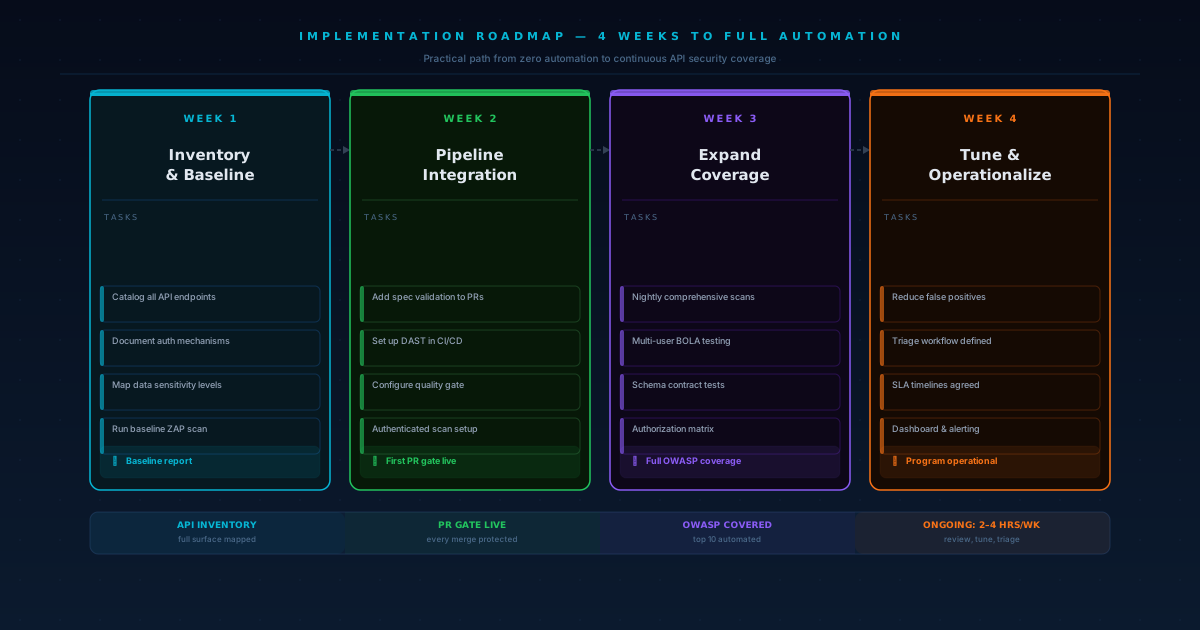
Implementation Checklist: From Zero to Automated API Security
If you're starting from scratch, here's a practical path to full automation. This isn't a weekend project — plan for 2–4 weeks of setup and tuning for a medium-complexity API.
Week one: inventory and baseline. Catalog every API endpoint (including internal and partner APIs). Document authentication mechanisms, authorization models, and data sensitivity levels. Run a baseline scan with OWASP ZAP to understand your current vulnerability posture.
Week two: pipeline integration. Add API spec validation to your PR checks. Set up a DAST tool in your CI/CD pipeline with a quality gate for critical findings. Configure authenticated scanning with test accounts at each privilege level.
Week three: expand coverage. Add scheduled comprehensive scans (nightly or weekly). Implement multi-user authorization testing to catch BOLA and BFLA vulnerabilities. Set up schema contract testing to detect data exposure regressions.
Week four: tune and operationalize. Reduce false positives by tuning scanner configurations. Establish a vulnerability triage workflow — who reviews findings, SLAs for fix timelines, and exception processes. Set up dashboards and alerting so security posture is visible to the team.
After initial setup, ongoing maintenance typically requires 2–4 hours per week: reviewing new findings, updating scan configurations as APIs change, and tuning false positive filters.
Common Pitfalls and How to Avoid Them
Teams that implement API security automation often hit the same obstacles. Knowing them upfront saves weeks of frustration.
The most common pitfall is alert fatigue from false positives. If your scanner flags hundreds of non-issues on the first run, developers learn to ignore all findings. Start with a conservative configuration that only flags high-confidence vulnerabilities, then gradually increase sensitivity as you build trust in the tooling.
Another frequent mistake is testing only unauthenticated endpoints. Many teams configure their DAST tools without authentication tokens, which means the scanner only sees what an anonymous user sees. The most critical vulnerabilities — broken authorization, privilege escalation, data exposure — require authenticated sessions to detect. Invest time upfront in configuring authenticated scanning with tokens for multiple user roles.
Treating security findings as the security team's problem undermines the entire shift-left approach. When vulnerability reports go into a separate queue that developers never check, fix times balloon. Instead, surface findings as PR comments or IDE warnings — the same channels developers already monitor for build failures and linting issues.
Finally, don't neglect API inventory management. You can't test APIs you don't know exist. Shadow APIs — endpoints that exist in production but aren't documented — are a growing attack surface. Run periodic API discovery scans that analyze network traffic to identify undocumented endpoints, and add them to your testing scope.
Measuring Success
Automation without metrics is just noise. Track these indicators to know whether your API security testing program is actually working.
Mean time to detection (MTTD) measures how quickly vulnerabilities are found after introduction. With pre-merge scanning, this should be hours, not weeks. Vulnerability escape rate tracks how many issues reach production — the goal is a declining trend over quarters. Fix SLA compliance shows whether your team actually resolves findings within agreed timelines. And false positive rate tells you whether your tools are generating signal or noise — above 30% false positives and developers start ignoring results entirely.
FAQ
How much does automated API security testing add to build times?
Spec validation and fast DAST scans typically add 2–5 minutes per pipeline run. Comprehensive scans run on a schedule (nightly) and don't block deployments, so they have zero impact on developer velocity.
Can automated testing replace manual penetration testing?
No. Automated testing covers known vulnerability patterns and regressions at high speed. Manual testing finds business logic flaws, complex attack chains, and novel exploitation techniques. The optimal strategy combines both — automation for breadth and speed, manual testing for depth.
What's the minimum viable API security automation setup?
Start with OWASP ZAP integrated into your CI/CD pipeline. It's free, open-source, and covers the OWASP API Top 10. Add authenticated scanning with two test accounts (regular user and admin) to catch authorization flaws. This baseline is achievable in a few days and catches the majority of common API vulnerabilities.
How does AI change API security testing?
AI-powered testing platforms generate context-aware test cases rather than replaying static payloads. They can discover undocumented endpoints, understand API behavior patterns, adapt attack strategies based on responses, and chain multiple vulnerabilities into realistic attack paths. This bridges the gap between automated scanning and manual penetration testing.
Which OWASP API vulnerabilities are hardest to detect automatically?
Broken Function Level Authorization and Unrestricted Access to Sensitive Business Flows are the most challenging for automated tools because they require understanding the application's intended access model and business rules. AI-augmented testing improves detection for these categories but manual review remains important.